
Protect Traffic: Website Redesign Checklist With GA4 & 301 Redirects
A website redesign checklist is a phase-based playbook that protects your SEO equity and business outcomes while you rebuild the site. Start today by exporting your GA4 baseline reports and crawling the site for a full URL list. A successful redesign preserves the traffic and conversions you already earn while improving speed and accessibility. Everything below walks through that process phase by phase.
TL;DR:
- A comprehensive redirect map must be created and maintained from day one to prevent long-tail traffic loss during the launch.
- Proper staging that mirrors production and immediate post-launch verification of analytics and sitemap submission are critical for seamless transition.
- Core Web Vitals thresholds should be established as development targets to avoid performance issues that could harm search rankings after launch.
- Sign-off at each phase, including prototypes and the redirect map, prevents scope creep and keeps the project on schedule.
- A dedicated owner for governance tasks like sign-offs and redirect management helps avoid delays caused by decision ambiguity.
Table of Contents
- What Is a Website Redesign vs. a Refresh?
- Phase 1: Audit and Planning
- Phase 2: Content Inventory and Information Architecture
- Phase 3: Design, Wireframes, and Prototypes
- Phase 4: Development, Technical SEO, and Migration Planning
- Phase 5: Pre-Launch QA and Testing
- Phase 6: Launch Checklist for Cutover Day
- Phase 7: Post-Launch Monitoring for the First 30 Days
- Common Mistakes That Sink Redesign Projects
- Why Governance Matters More Than the Design Itself
- How Dotxero Handles Redesign Projects From Build to Measurement
- Tools Worth Bookmarking for Every Phase
- Sources
- FAQ
What Is a Website Redesign vs. a Refresh?
A refresh updates visuals, copy, or a handful of templates without touching the underlying architecture. A redesign rebuilds information architecture, design system, and often the content strategy, while keeping the same platform. A replatform moves the whole site to new software (say, from a legacy CMS to WordPress or a headless stack) and usually forces a redesign alongside it.
You need a full redesign, not a refresh, when you notice:
- Persistent user experience complaints (confusing navigation, high bounce on key pages) that copy edits haven’t fixed
- A steep, sustained drop in traffic or conversions that correlates with structural site issues, not seasonality
- A brand repositioning that makes the current visual language inaccurate
- Platform limits that block features you need (site speed, mobile rendering, integrations)
If none of those apply, a targeted refresh probably solves your problem faster and cheaper than a full rebuild.
Phase 1: Audit and Planning
Before anyone touches a design tool, capture where the site stands today. Skipping this step is how teams lose their best-performing pages without realizing it until traffic drops weeks later.
- Export GA4 historical reports covering at least 12 months: top landing pages, conversion funnels, and engagement metrics by device and channel.
- Crawl the entire site with a tool like Screaming Frog or Sitebulb to export every indexed URL. This list becomes your content inventory and, later, your redirect map.
- Pull Search Console data for your highest-ranking pages and queries so design and content decisions don’t accidentally bury what already works.
- Set SMART goals and KPIs tied to specific numbers: conversion rate targets, page load time targets, accessibility compliance level.
- Define your core project team — typically a project lead, content strategist, designer, developer, and an SEO owner — and set clear sign-off points so no one discovers a decision after it’s already built.
Pro Tip: Assign one person to own the redirect map from day one. Treat it as a living document that gets updated every time a page is merged, renamed, or killed during the content audit.
This is also where you decide who has final say on scope. Vague ownership at this stage is the single biggest reason redesign timelines stretch from three months to seven.
Phase 2: Content Inventory and Information Architecture
Every page on your current site falls into one of four buckets, and sorting them is the job of a ROT analysis: Redundant, Outdated, or Trivial content gets flagged for removal, while everything else gets tagged keep, merge, rewrite, or kill. Neil Patel’s redesign process frames this audit as the step that keeps a rebuild focused on pages that actually earn traffic or conversions, rather than migrating everything by default. A meaningful share of pages on most older sites get zero organic traffic; those are strong candidates for consolidation rather than a like-for-like move to the new site.
Once you know what’s staying, map old URLs conceptually to the new structure. You don’t need final URLs yet, just a rough sketch of which old page becomes which new page, since that’s the seed of your 301 redirect map.
Three rules keep the new architecture usable:
- Aim for a three-click depth from homepage to any page that matters for conversions.
- Keep taxonomy labels the way your customers talk, not the way your internal team talks.
- Prioritize navigation around the handful of templates driving most of your traffic and revenue, not every page equally.
Not every page needs to launch on day one. High-traffic, high-conversion templates go in the initial launch; secondary content (old blog archives, niche resource pages) can migrate in phased rollouts after cutover, once the core experience is stable.
Phase 3: Design, Wireframes, and Prototypes
Design work moves through three stages for each core template: low-fidelity wireframes to lock layout logic, high-fidelity mockups to lock visual style, then an interactive prototype to test flow before a single line of code gets written. Skipping straight to mockups is a common shortcut that costs you later, because layout problems are far cheaper to fix in wireframe form.
Build out a design system alongside the templates, not after them. That means documenting:
- Typography, color tokens, and spacing rules in a format developers can reference directly
- Reusable components (buttons, cards, forms) with defined states, not one-off styling per page
- Accessibility patterns baked into each component, not bolted on later
Accessibility deserves specific attention here, because most WCAG failures get designed in, not coded in. Common traps include insufficient color contrast, form fields without visible labels, and interactive elements that rely on hover alone. Catching these in the prototype stage is far cheaper than catching them in a post-launch audit.
Pro Tip: Freeze visual design before development starts. A stakeholder who wants to “just tweak” the homepage hero once dev is underway is the single most common source of scope creep on redesign timelines.
Get formal sign-off on the prototype from every stakeholder who has veto power. Verbal approval in a meeting doesn’t count; get it in writing so nobody revisits the decision three weeks into development.
Phase 4: Development, Technical SEO, and Migration Planning
Development is where SEO risk concentrates, and it’s also where most redesign checklists get vague right when specificity matters most.
Start with a clean developer handoff package: finalized specs, the component library from your design system, a complete asset manifest, and integration notes for any third-party tools (CRM, booking systems, payment processors). Handoffs missing any of these pieces almost always produce rework.
Set a performance budget before writing code, not after. Core Web Vitals thresholds for LCP, INP, and CLS should function as build acceptance criteria, checked in every sprint rather than measured for the first time after launch. Treating these metrics as a post-launch surprise means you’ll be retrofitting a site that was never built to hit them.
The SEO migration steps matter more than almost anything else in this phase:
- Finalize the export of every indexed URL from your pre-launch crawl.
- Draft a one-to-one 301 redirect map connecting every old URL to its new destination. Avoid blanket redirects to the homepage; they lose the relevance signals search engines assign to specific pages.
- Verify canonical tags point to the correct new URLs, not legacy ones.
- Confirm metadata (titles, descriptions, structured data) migrated correctly for every priority page.
Most redesign-related traffic loss traces back to incomplete or incorrect redirect mapping.
Staging rules matter just as much: staging must mirror production exactly, block search engine indexing with a noindex tag or password protection, and get a full crawl run against your redirect map before anyone signs off on launch readiness.
Phase 5: Pre-Launch QA and Testing
QA is where teams either catch problems or ship them to production. Run through functional QA methodically:
- Test every internal and external link for broken destinations.
- Submit every form (contact, quote request, newsletter signup) and confirm the data lands where it should.
- Test site search with realistic queries, not just obvious ones.
- Run full checkout or lead-conversion flows end to end.
- Confirm every third-party API integration (payment gateways, booking tools, CRM sync) fires correctly.
Beyond function, four categories need dedicated attention:
- Performance: sample Core Web Vitals across key pages and run Lighthouse audits on mobile and desktop.
- Caching: confirm CDN and browser caching rules are configured correctly, not left on default settings.
- Accessibility: test keyboard-only navigation, run a screen reader smoke test on core templates, and verify logical focus order.
- Analytics: verify Tag Manager containers fire correctly, test GA4 events for every tracked interaction, and validate that conversion actions record properly before launch.
A significant share of website traffic now comes from mobile devices, according to Statista’s traffic-share data, which is exactly why mobile testing can’t be an afterthought squeezed in after desktop QA passes.
Phase 6: Launch Checklist for Cutover Day
Cutover deserves its own short, tight checklist, executed in order:
- Schedule the DNS cutover during a genuinely low-traffic window, and assign specific on-call roles so someone is watching every system during the transition.
- Validate the SSL certificate is active and correctly configured on the new domain or server.
- Confirm robots.txt allows crawling of the new site (a shockingly common launch-day mistake is leaving a staging noindex tag live).
- Submit the new XML sitemap to Search Console and verify 301 redirects are firing correctly, not returning soft 404s.
- Confirm GA4 and Search Console are tracking the live site, then sample a handful of conversions and critical pages to verify data is flowing.
- Run a fresh crawl of the live site and compare indexing status against your pre-launch export to catch anything that didn’t migrate as planned.
Analytics tag verification and sitemap submission should happen within hours of cutover, not days, according to Neil Patel’s redesign guidance, which lists both as immediate post-launch actions rather than first-week cleanup items.
Phase 7: Post-Launch Monitoring for the First 30 Days
The first 72 hours need daily attention: check uptime monitoring, spot-check Core Web Vitals on your top pages, and review server error logs for anything spiking unexpectedly.
For the following 30 days, shift to a weekly cadence:
- Track organic landing page traffic against your pre-redesign baseline, page by page.
- Watch for ranking shifts on your priority keywords in Search Console.
- Monitor conversion funnels for drop-off points that didn’t exist on the old site.
Know your rollback threshold before you need it. A hotfix handles isolated bugs (a broken form, a missing redirect); a rollback becomes necessary when core conversion paths are broken and a quick patch isn’t realistic. Communicate either decision to stakeholders immediately, with a plain explanation of what broke and when it’ll be fixed.
Pro Tip: If conversions moved (up or down) on a high-traffic template, plan an A/B test rather than assuming the redesign caused it. Sometimes it’s a tracking issue, not a design issue.
Common Mistakes That Sink Redesign Projects
Incomplete 301 mapping is, by a wide margin, the most frequent cause of post-launch traffic loss. Teams map their top 50 pages and assume the rest don’t matter, then wonder why long-tail organic traffic craters.
A few other patterns show up again and again:
- Staging environments that don’t mirror production closely enough, hiding bugs until they’re live
- Accessibility and Core Web Vitals treated as launch-week fixes instead of development acceptance criteria
- No one running a manual audit of staging, which catches unmapped legacy URLs and broken canonical tags that automated scanners miss
- Governance gaps where no one owns sign-off, so decisions get revisited after work is already built
Redesign projects are best structured around checkpoints with defined sign-off gates and transparent reporting at each phase, so clients see progress against the plan rather than a surprise at the end.
Why Governance Matters More Than the Design Itself
If you strip a redesign project down to three priorities, they are: agree on KPIs before design starts, own the redirect map from day one, and get real stakeholder alignment at every gate, not just at kickoff and launch.
Weekly standups during a redesign should be short and structural: what shipped, what’s blocked, what needs a decision this week. Acceptance gates work best when they’re binary. Either the prototype matches the approved wireframe or it doesn’t. Either the redirect map covers every indexed URL or it doesn’t.
A simple sign-off template helps: content inventory approved, wireframes approved, visual design frozen, staging QA passed, launch go/no-go. Five gates, five named approvers, no ambiguity about who unblocks what.
The teams that struggle aren’t usually the ones with design problems. They’re the ones where nobody owned the decision, so the same argument happened three times.
— Will
How Dotxero Handles Redesign Projects From Build to Measurement
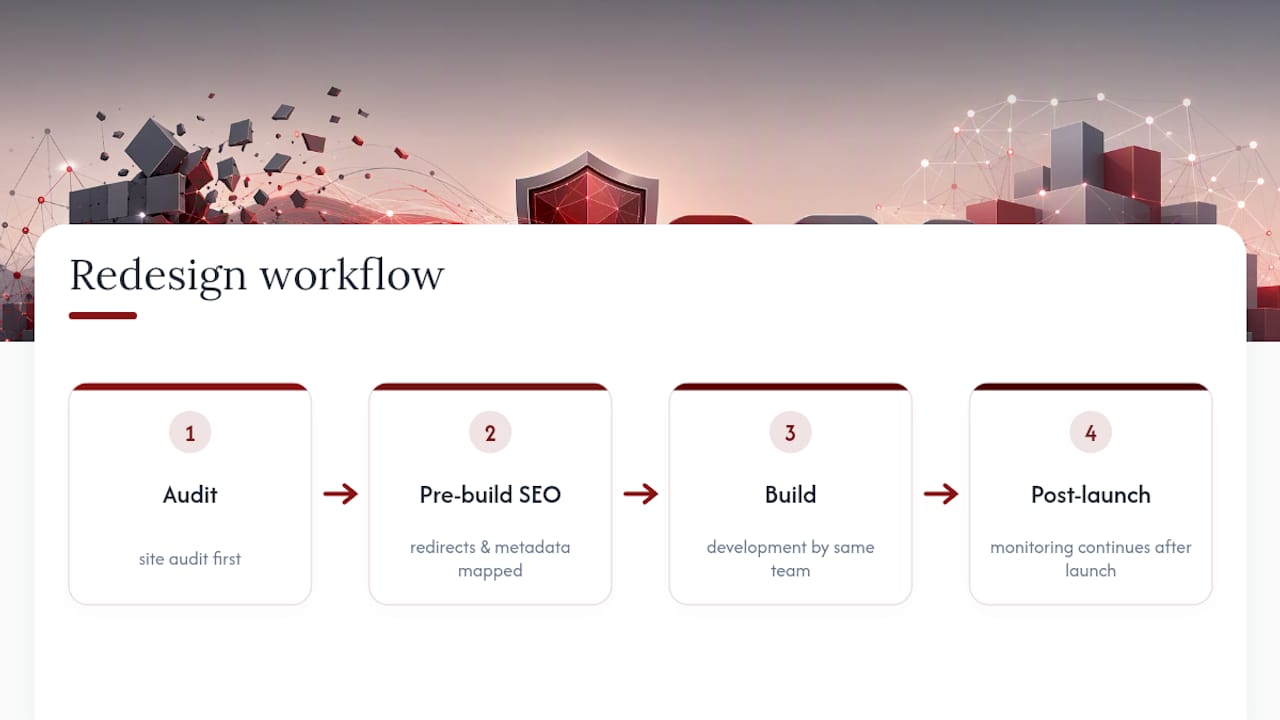
Some companies handle custom website builds in a structured manner following an audit first, with technical SEO migration planned before development starts, and monitoring that continues after launch instead of stopping at cutover.

Working with one vendor for both the build and the ongoing measurement means your redirect map, your GA4 tracking setup, and your post-launch monitoring all come from the same team that built the site, rather than getting handed between a developer and a marketer who never talk to each other. That gap is where a lot of redesign traffic loss actually happens. Dotxero’s website development work is paired with technical SEO support so redirect mapping and metadata migration get handled by people who also watch the rankings afterward.
If your redesign involves industries like law firms, contractors, jewelers, or retail, and you want a team that treats the audit and the redirect map as seriously as the visual design, request a redesign assessment through Dotxero’s website development page to see what a phase-gated project plan looks like for your site specifically.
Tools Worth Bookmarking for Every Phase
Google’s PageSpeed Insights checks Core Web Vitals against real thresholds. Screaming Frog handles URL crawls and redirect testing. Konvuno’s site search and navigation tools help validate whether your new information architecture actually reduces search friction for visitors.
Sources
- The Complete Website Redesign Checklist (2026 Edition) — dp.vision
- Website redesign in 2026: Process, cost & SEO safety guide — Netguru
- Website redesign process — Neil Patel
FAQ
What Are the Steps to a Website Redesign?
The core phases are audit and planning, content inventory and information architecture, design and prototyping, development and technical SEO migration, pre-launch QA, launch, and 30 days of post-launch monitoring.
What Should You Do Before a Website Redesign?
Export your GA4 baseline data, crawl the site for a full URL list, and set SMART KPIs tied to conversions, speed, and accessibility before any design work begins.
How Much Does a Full Website Redesign Cost?
Cost depends heavily on site size, number of custom templates, and whether you’re replatforming, so there’s no single figure that applies across projects; a detailed quote requires reviewing your specific scope.
Will I Lose Google Ranking If I Redesign My Website?
You risk losing rankings mainly when redirect mapping is incomplete or metadata gets dropped during migration, which is why a one-to-one 301 redirect map and canonical tag verification are treated as non-skippable steps in this checklist.