
2026 AI Ready Technical SEO Audit Checklist: Template First Fixes
Start with crawlability and indexation: robots.txt, sitemaps, and status codes, since broken discovery wastes every other fix. Move next to template-level errors that touch thousands of pages at once, then performance, then structured data and AI crawler access. Sample the top pages first, focusing on those most important, and schedule recurring automated scans so regressions get caught before they cost rankings.
TL;DR:
- Fix crawlability issues first by auditing robots.txt, sitemaps, and status codes to ensure search engines can discover and index your pages effectively.
- Prioritize site-wide template errors and focus sampling efforts on the most impactful pages, especially for large sites with frequent updates.
- Regularly schedule automated scans, with weekly checks for dynamic sites, to catch regressions in indexation, performance, or crawl errors early.
- Address critical index-blocking problems first, such as noindex tags or disallowed robots.txt directives, before optimizing content or performance.
- Use impact divided by effort scoring to plan quick wins like fixing template errors or redirect chains within the first 30 days.
Table of Contents
- What Should a Technical SEO Audit Checklist Cover First?
- How Do You Check Crawlability and Indexation Issues?
- How Do You Fix Site Architecture and Internal Linking Problems?
- What On-Page Technical Elements Need Checking?
- What Are the Core Web Vitals Targets for a Technical SEO Audit?
- How Do You Audit JavaScript Rendering for SEO?
- What Schema and Structured Data Should You Prioritize for AI Search?
- How Do You Check Security, Redirects, and Broken Links?
- What Tools Should You Use to Automate SEO Audits?
- How Do You Build an Impact vs. Effort Remediation Roadmap?
- What Does a Full Technical SEO Audit Process Look Like Step by Step?
- Why This Checklist Reflects How Dotxero Runs Real Audits
- When Should You Hire an Agency Instead of Fixing SEO In-House?
- Get a Technical SEO Audit From Dotxero
- Sources
- FAQ
What Should a Technical SEO Audit Checklist Cover First?
A technical SEO audit checklist works only when it’s sequenced correctly. Fixing page speed on a page Google can’t even find is wasted effort. The order matters as much as the checklist itself.
Before touching anything else, define what success looks like. Pick 2 to 3 KPIs you’ll track before and after remediation: organic sessions to the affected pages, average position for target queries, and the ratio of indexable to total pages in your sitemap. Without these, you’re just collecting a list of problems with no way to prove the fixes worked.
Scope comes next. Auditing every page on a 40,000 page ecommerce catalog line by line isn’t realistic, and it isn’t necessary. Sampling the top 50 to 100 pages by traffic or revenue keeps the initial pass manageable and focused on impact, and it surfaces template-level problems faster than a brute-force full crawl. If ten product pages share the same broken canonical tag, you don’t need to check all ten. You need to check the template.
Cadence depends on how much the site changes. A brochure site with quarterly content updates can run a full baseline audit once a quarter. Sites publishing weekly need monthly checks at minimum. Large or ecommerce sites with frequent template changes, new product feeds, and third-party script updates need weekly automated scans, because a single deploy can silently add a sitewide noindex tag.
Once you’ve found issues, sort them:
- Critical: blocks indexing or crawling entirely (noindex on money pages, robots.txt disallow on the whole site)
- High: measurable ranking or traffic impact (broken canonical logic, missing hreflang on international templates)
- Medium: on-page inconsistencies that hurt CTR or clarity (duplicate title tags, missing alt text)
- Low: cosmetic or minor technical debt (redirect chains with only one hop, unused meta tags)
Assign an owner to each tier before you move to remediation. A prioritized list nobody owns just becomes next quarter’s backlog.
How Do You Check Crawlability and Indexation Issues?
Resolve discovery and access problems before you touch anything else. Fixing Core Web Vitals on a page search engines can’t crawl doesn’t move the needle. Semrush’s guidance on this is blunt: start with robots.txt, status codes, and sitemaps before optimizing content or performance, because template-level access fixes scale faster than individual page tweaks.
Here’s the sequence that catches the most common failures:
- Audit robots.txt line by line. Look for accidental
Disallow: /directives left over from a staging environment, blocked CSS/JS folders that break rendering, and blocked parameter paths that were meant to stop crawl waste but instead blocked category pages. Then check whether you’re explicitly allowing AI crawlers where you want them: GPTBot, OAI-SearchBot, ClaudeBot, and PerplexityBot. If you want your content cited in AI answers, blocking these bots defeats the purpose. - Validate your XML sitemap. Confirm it only lists indexable, canonical, 200-status URLs, then submit it to both Google Search Console and Bing Webmaster Tools. Sitemaps padded with redirects, 404s, or noindexed pages confuse crawlers about what actually matters on your site.
- Hunt for noindex and X-Robots-Tag conflicts. A page can carry a noindex meta tag in the HTML while the HTTP header says something else entirely, or a CMS plugin can apply a sitewide noindex during a migration and never get reverted. Check canonical tags too. Self-referencing canonicals are fine; canonicals pointing to the wrong URL variant (HTTP instead of HTTPS, non-www instead of www) quietly cannibalize your own rankings.
- Cross-check server logs against Search Console coverage. GSC tells you what Google says it’s doing. Log files tell you what’s actually happening. When they disagree, that’s your signal something is misconfigured, whether it’s a bot getting rate-limited or a page GSC claims to have indexed that never actually got crawled.
- Find orphan pages. Any page with zero internal links pointing to it is invisible to crawlers no matter how good the content is. Cross-reference your CMS page list against your crawl data. Every orphan gets at least one contextual internal link from a relevant, already-indexed page.
Pro Tip: Run a “fetch as Google” style test with the URL inspection tool on five pages you assume are indexed correctly. Assumptions about indexation are wrong more often than most audits admit, especially after a CMS update or redesign.
How Do You Fix Site Architecture and Internal Linking Problems?
Fix templates before you fix pages. A single misconfigured category template can create the exact same crawl-depth problem on 500 pages at once, and fixing that template resolves all 500 in one deploy instead of 500 separate edits.

Crawl depth is the metric to watch. If a page sits five or more clicks from the homepage, crawlers visit it less often and users almost never find it through navigation. Flatten deep content by adding it to relevant category pages, hub pages, or a more logical menu structure. You don’t need a flat site architecture everywhere, just for pages that matter.
A few structural habits pay off repeatedly:
- Use breadcrumbs on every deep page, and mark them up with
BreadcrumbListschema so both users and search engines understand hierarchy. - Group content into logical categories that mirror how users actually search, not how your internal team organizes departments.
- Handle pagination with clear, crawlable
rellinks or explicit “view all” alternatives rather than infinite scroll that hides content from crawlers. - Set a canonicalization rule for parameterized URLs and faceted navigation before launch, not after Google has indexed 40,000 filter combinations of the same 200 products.
Faceted navigation deserves its own mention here because it’s the single most common cause of runaway index bloat on ecommerce sites. Every color, size, and sort filter combination generates a unique URL, and without a canonical strategy, search engines index all of them as separate thin pages competing with your actual product listings.
What On-Page Technical Elements Need Checking?
Title tags and meta descriptions get audited for uniqueness first. Duplicate titles across dozens of pages tell search engines those pages are interchangeable, which is rarely true and always damages rankings. Keep titles under roughly 60 characters so they don’t truncate in search results, and match search intent directly rather than stuffing keywords.
Heading structure matters more than most audits treat it. Every page needs exactly one H1, followed by a logical H2/H3 hierarchy that mirrors how the content is actually organized. Multiple H1s or headings used purely for visual styling instead of structure confuse both crawlers and screen readers.
Run these checks systematically:
- One H1 per page, matching the primary topic and search intent
- Alt text on every meaningful image, describing content rather than stuffing keywords
- No duplicate or near-duplicate content across URL variants (check trailing slashes, parameters, and print versions)
- Thin pages with under roughly 150 words of unique content flagged for consolidation or expansion
- Canonical tags that don’t contradict meta robots directives (a canonical pointing to a page that itself carries a noindex tag creates a dead end)
Duplicate content deserves a closer look because it rarely comes from copy-paste. It comes from URL structures: ?sort=price, ?ref=email, session IDs, and print-friendly versions all generate technically distinct URLs serving identical content. A crawler doesn’t know these are duplicates unless your canonical tags tell it explicitly.
What Are the Core Web Vitals Targets for a Technical SEO Audit?
Core Web Vitals thresholds tightened for 2026, and the targets now sit at LCP under 2.0 seconds, INP under 200 milliseconds, CLS under 0.1, and FCP under 0.4 seconds. That last metric matters more than it used to. AI systems that summarize or cite web content tend to favor pages that render meaningful content fast, and a slow First Contentful Paint delays the point at which any crawler, human or otherwise, sees anything worth citing.
| Metric | 2026 Target | What It Measures |
|---|---|---|
| LCP | Under 2.0s | Time until the largest visible element loads |
| INP | Under 200ms | Responsiveness to user interaction |
| CLS | Under 0.1 | Visual stability during page load |
| FCP | Under 0.4s | Time until first content appears |
Fix in this order: server response time first, since every other metric depends on how fast the server hands off the first byte. Then image compression and modern formats like WebP or AVIF. Then caching headers and a CDN if you don’t already have one. Then render-blocking CSS and JavaScript, deferring anything that doesn’t affect the first screen.
Decide early whether a performance problem is a template issue or a page issue. If every product page loads slowly because of an unoptimized carousel script, fix the template. If one specific landing page is slow because someone uploaded a 4MB hero image, fix that page. Confusing the two wastes development time on either overbuilt fixes or endless one-off patches.
Pro Tip: Lab tools like PageSpeed Insights show you a controlled snapshot. Real User Monitoring data shows what actual visitors on actual devices and connections experience. Use both. A page that scores well in the lab can still feel slow on a mid-range phone over a spotty connection.
How Do You Audit JavaScript Rendering for SEO?
JavaScript-heavy sites hide content from crawlers more often than site owners realize. The fix starts with figuring out whether that’s actually happening on your site, and how badly.
Open the URL inspection tool in Search Console and compare the rendered HTML against what a browser shows a real user. If your product descriptions, pricing, or key copy only appear after JavaScript executes, and the inspection tool doesn’t show them in the rendered version, crawlers may be missing exactly the content you want indexed. Server logs add another layer of confirmation: check whether Googlebot’s rendering requests are timing out or getting truncated before your JavaScript finishes executing.
Common fixes, roughly in order of effort:
- Pre-render critical above-the-fold content on the server so it’s present in the initial HTML response
- Move the actual answer to a question out from behind a client-side accordion or tab that requires a click to reveal
- Avoid lazy-loading text content that search engines and AI crawlers need to see immediately
- Consider server-side rendering (SSR) or hybrid rendering for templates where client-side-only rendering consistently causes indexing gaps
Not every fix requires a development sprint. Moving one paragraph of answer content above a client-rendered widget is a content edit. Migrating an entire site from client-side rendering to SSR is a real engineering project, and it’s worth recommending only when the data shows a pattern of indexing failures tied specifically to rendering, not a one-off glitch on a single page.
What Schema and Structured Data Should You Prioritize for AI Search?
Four schema types deliver the most value for most sites: Article for content pages, FAQPage for question-and-answer content, HowTo for step-based instructions, and BreadcrumbList for navigation context. Structured data improves citation rates because it hands search engines and AI systems an unambiguous, machine-readable summary of what a page actually contains, instead of forcing them to infer it from prose.
Run through this validation sequence:
- Implement JSON-LD (not microdata) for every page type where it applies, since it’s easier to maintain and less error-prone than inline attributes.
- Test every template in validator.schema.org, not just one sample page, since a single broken field in a shared template can invalidate the markup across every page using it.
- Confirm AI crawlers are allowed in robots.txt and that your sitemap has been submitted to Bing Webmaster Tools, since Bing’s index feeds several AI search products beyond its own results page.
- Structure short, direct answer capsules under H2 headings near the top of key pages, since HTML-first content that leads with a clear answer is what most AI systems pull from when generating a citation.
- Track schema errors in Search Console monthly and watch for movement in rich result impressions as a leading indicator that your structured data is being read correctly.
AI readiness has become part of technical SEO, not a separate initiative. The definition of a complete technical audit now includes AI crawler access and schema quality alongside the traditional crawlability and performance checks. A partner resource on structured data breaks down more than 30 rich result types worth testing if your site has FAQ, product, or event content that isn’t yet marked up.
How Do You Check Security, Redirects, and Broken Links?
HTTPS is table stakes, but the details still trip up audits. Check certificate expiry dates (an expired cert can silently drop a site out of rankings within hours), confirm HSTS headers are configured to prevent downgrade attempts, and scan for mixed content warnings where HTTPS pages still load images, scripts, or stylesheets over plain HTTP.
Broken links and redirect chains waste crawl budget and erode user trust in equal measure. Work through these systematically:
- Crawl the full site for 4xx and 5xx status codes, then fix the source pages or remove internal links pointing to them
- Trace every redirect chain longer than one hop and collapse it to a single direct 301
- Eliminate redirect loops entirely, since they can stop a crawler from reaching a page altogether
- Confirm 301s are used for permanent moves and 302s only for genuinely temporary redirects, since search engines treat the two differently for link equity
- Cross-check server logs against your crawler’s redirect report to catch redirects that only trigger under specific conditions, like mobile user agents or certain query parameters
None of this is exciting work, but a site bleeding crawl budget on broken internal links and three-hop redirect chains is a site where important pages get crawled less often than they should.
What Tools Should You Use to Automate SEO Audits?
You need a handful of tool categories, not a dozen subscriptions. A crawler like Screaming Frog or Sitebulb handles the technical scan itself. Search Console and Bing Webmaster Tools show you what search engines actually see. PageSpeed Insights and a RUM tool cover performance from both the lab and the real-user angle. A log analyzer shows you actual bot behavior instead of inferred behavior.
Automation is where most audits fail to stick. A one-time crawl finds problems; it doesn’t catch the new ones that show up after next week’s deploy. Setting automated weekly or monthly crawls with alerts configured specifically for 5xx errors and unexpected robots.txt changes catches regressions before they compound into ranking losses.
A few practical rules for setting this up:
- Full crawls make sense monthly; weekly automated checks can run against just the sitemap or a custom list of your highest-value pages to save server load
- Configure alerts to fire on critical changes only (site-wide 5xx spikes, robots.txt disallow additions) so the team doesn’t tune out routine notifications
- Push crawl output directly into JIRA or Asana with an assigned owner and due date attached to each ticket
- Review the automated reports on a fixed schedule, even when nothing critical fired, since silent degradation (slowly rising page load times, for instance) doesn’t always trigger a hard alert
How Do You Build an Impact vs. Effort Remediation Roadmap?
A flat list of forty issues doesn’t get fixed. A ranked top ten does. Score every finding on two axes, estimated traffic or ranking impact and estimated effort to fix, then sort by impact divided by effort to surface the fastest wins first.
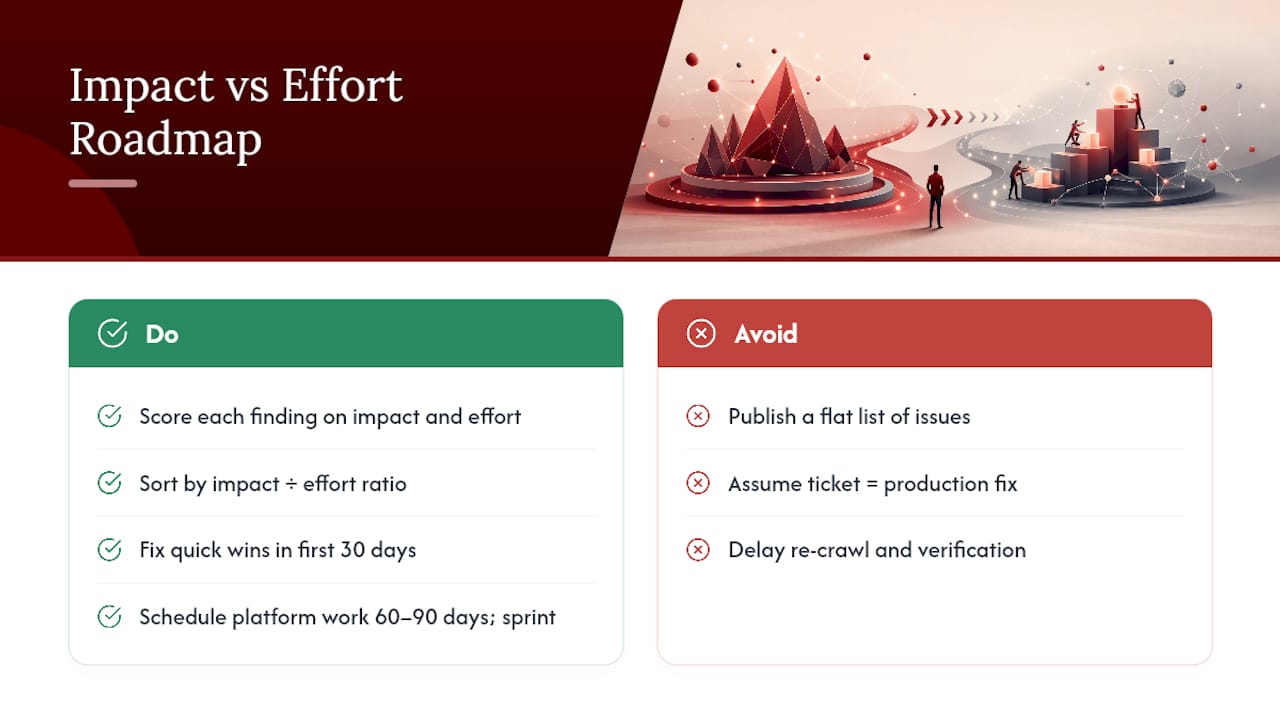
Quick wins, like fixing a sitewide template error or cleaning up a batch of redirect chains, belong in the first 30 days. Larger platform work, like an SSR migration, belongs in the 60 to 90 day window with its own dedicated sprint. After every fix ships, re-crawl the affected template or page set and confirm the issue actually resolved in production, not just in the ticket status.
What Does a Full Technical SEO Audit Process Look Like Step by Step?
Before crawling anything, gather access: Google Search Console, GA4, server log access, and a clear list of the KPIs you defined in the setup phase. Auditing without GSC access means guessing at indexation status instead of confirming it.
- Pre-audit setup. Confirm crawler settings match your site’s actual structure (JavaScript rendering enabled if needed, correct user agent, respect for robots.txt where relevant), pull baseline data from GSC and GA4, and select your sample of top pages plus a handful of representative low-traffic pages per template.
- Execution. Run the crawl, cross-reference against server logs, and manually inspect a sample of pages from each major template rather than relying solely on automated flags.
- Deliverables. Package findings into an executive summary for stakeholders, a prioritized spreadsheet or template with impact/effort scoring, and individual remediation tickets ready to assign. Downloadable audit templates organized by priority with pass/fail columns speed this step up considerably and give less experienced team members a consistent framework to follow.
- Post-audit verification. Re-crawl after fixes ship, confirm the KPIs are moving in the right direction, and set a recurring monitoring cadence. Regular audits, whether quarterly or semiannual, catch regressions before they compound into a full ranking drop.
Why This Checklist Reflects How Dotxero Runs Real Audits
This sequence isn’t theoretical. It mirrors how Dotxero structures technical SEO engagements for Las Vegas businesses across law firms, contractors, jewelers, and retailers, where a template fix often resolves issues across an entire product catalog or practice-area page set in one deploy.
A few things that shape how the work actually gets done:
- Audits start with a scoped discovery phase, pulling GSC, GA4, and log data before any recommendations get written
- Findings get delivered as a prioritized roadmap with clear ownership, not a raw list of technical jargon nobody on the client side can act on
- When fixes require code changes, Dotxero’s website development team handles the handoff directly instead of leaving the client to interpret a report and find their own developer
- Clients get access to the same kind of prioritized checklist and template structure outlined here, adapted to their specific CMS and site architecture
Transparent reporting matters here specifically because technical SEO work is invisible to most business owners until they see the KPI movement. Showing the before-and-after on indexed page count or Core Web Vitals scores is what turns a line-item invoice into a trusted retainer.
When Should You Hire an Agency Instead of Fixing SEO In-House?
Handling a technical audit in-house works fine for a small site with a patient owner and some spare time. It stops working once the site crosses a few hundred pages, the dev team is stretched across other priorities, or nobody on staff has bandwidth to run monthly monitoring on top of everything else.
An agency engagement should give you a scoped audit with a clear deliverable list, not an open-ended retainer with vague promises. Expect a discovery phase, a prioritized findings report, and a remediation phase where fixes actually ship, followed by verification. Dotxero scopes technical SEO work this way: audit, prioritized roadmap, implementation (either through its own website development team or in direct collaboration with your existing developers), and a follow-up report showing what moved.
The agencies worth hiring hand you the checklist and the reasoning behind it, not just a stack of unexplained tickets.
— Will
Get a Technical SEO Audit From Dotxero
Running this checklist properly takes real hours: crawling, cross-checking logs, validating schema, and prioritizing fixes that a development team can actually execute. Dotxero handles the full technical SEO audit for Las Vegas businesses, from crawlability and indexation through Core Web Vitals and AI search readiness, and delivers a prioritized roadmap instead of a raw list of errors.

The process starts with access to Google Search Console, GA4, and your CMS, plus a short call to confirm your top priority pages. From there, expect a findings report within one to two weeks depending on site size, followed by a remediation phase where fixes get implemented directly or handed off to your development team with clear specs. Dotxero’s SEO services cover ongoing monitoring after the initial audit too, so regressions get caught before they cost you rankings. If your site also needs template-level rebuilding rather than patchwork fixes, the website development team handles that under the same engagement. Reach out through Dotxero to get a scope and timeline for your site.
Sources
- Technical SEO Checklist: The Complete Guide For 2026 | DebugBear
- Technical SEO checklist (Semrush blog)
- Technical SEO Audit Checklist & Template – Sitebulb
FAQ
How do you do a technical SEO audit?
Start with crawlability and indexation (robots.txt, sitemaps, status codes), then fix template-level issues, then move to performance and structured data, checking the top 50 to 100 pages first before scaling to a full-site crawl.
What is included in an SEO audit checklist?
A complete checklist covers crawlability and indexation, site architecture, on-page elements like titles and headings, Core Web Vitals, structured data, security and redirects, and a prioritized remediation roadmap with assigned owners.
How do you check your technical SEO score?
There’s no single universal “score,” but tools like Google Search Console, PageSpeed Insights, and a site crawler like Screaming Frog or Sitebulb together show indexation status, Core Web Vitals, and structural errors that combine into an overall technical health picture.
How long does a technical SEO audit take?
A focused audit on the top 50 to 100 pages typically takes one to two weeks depending on site size and complexity, while a full-site audit on a large ecommerce catalog can take longer, especially when template-level issues require developer coordination.
How often should you run a technical SEO audit?
Run a full baseline audit quarterly, monthly checks for actively updated sites, and automated weekly scans for large or ecommerce sites where template or catalog changes happen frequently.