
Google Ads Budget: Use 30.4, Test, Then Scale
Use an average daily budget for ongoing campaigns and a campaign total budget for fixed, time-bound promotions. Start by converting your monthly target into a daily number: divide by the 30.4 multiplier that Google uses to represent an average month. Run that number through Performance Planner before you commit spend, and expect Google to pace delivery unevenly across days as it chases results within the month.
TL;DR:
- Use campaign total budgets for fixed date campaigns; they require at least three days, and you cannot later switch from daily budgeting.
- Google may serve up to twice your daily budget on busy days, while its monthly spend limit remains your daily budget multiplied by 30.4.
- Set spend from your target CPA or ROAS, expected conversion rate, and CPC to avoid choosing a budget based on an arbitrary round number.
- Reserve 60% for proven campaigns, 30% for growth, and 10% for experiments; review weekly and shift funds toward campaigns meeting targets.
- Keep remarketing on a separate budget line because a small or changing audience can otherwise absorb spend or restrict prospecting campaigns.
Table of Contents
- Choosing between average daily, campaign total, and shared budgets
- How Google paces spend: daily limits, monthly caps, and billing
- How to calculate a starting Google Ads budget
- Allocating, testing, and scaling your budget over time
- Google’s planning and forecasting tools
- Setting budgets for remarketing campaigns
- How an agency actually builds and manages a client’s budget
- Let us set and manage your Google Ads budget
- FAQ
- Sources
Choosing between average daily, campaign total, and shared budgets
Most advertisers should default to an average daily budget. It is the flexible, ongoing option built for campaigns that run indefinitely, and Google adjusts daily delivery around that average based on traffic and opportunity. A campaign total budget works differently: you set a fixed amount to spend across a defined date range, which suits a product launch, a holiday sale or any promotion with a hard start and end date.
Two constraints matter before you pick one:
- You select the budget type when you create the campaign, and you cannot switch from a daily budget to a campaign total budget later.
- Campaign total budgets carry a minimum duration of three days, so they do not work for single-day pushes.
A shared budget is a third option worth knowing: it lets several campaigns draw from one pool rather than each holding its own cap. This fits advertisers running near-identical campaigns, such as parallel geo-targeted versions of the same offer, where it’s easier to manage spend as one line instead of several.
How Google paces spend: daily limits, monthly caps, and billing
Google does not spend your exact daily budget every single day. On higher-traffic days it can serve up to roughly 2 times your daily budget for most campaign types, and on slower days it may spend less, balancing out over the course of a month. The ceiling on total monthly spend is your daily budget multiplied by 30.4, the average number of days in a month.
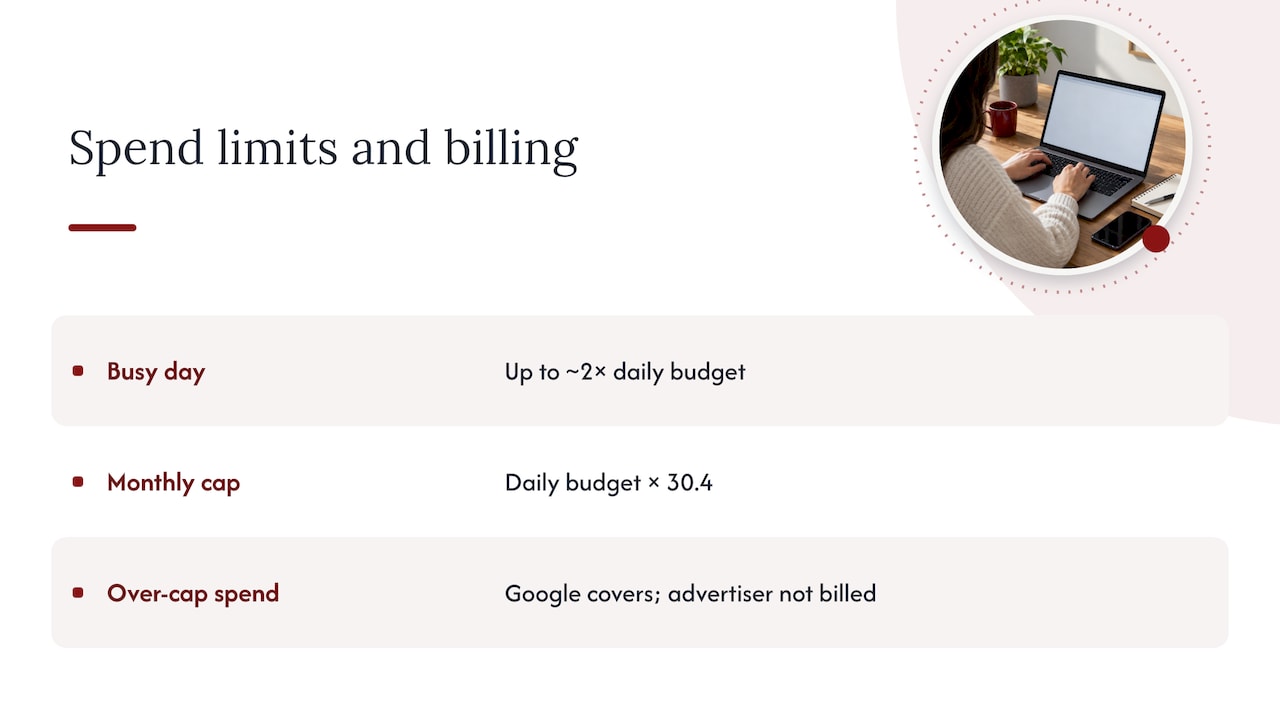
Statistic: Google’s own guidance states the monthly spending limit equals your daily budget times 30.4, and that any spend beyond the daily or monthly cap is covered by Google itself, not billed to the advertiser. That distinction between served costs and billed costs means overages on a busy day are not a budgeting risk.
A few practical notes follow from this. Budget changes can affect how much your campaign spends, so review pacing after making an adjustment. Ad scheduling affects when your ads can be shown, so review how it affects campaign pacing. A campaign may spend less than its daily budget, so review its delivery before deciding whether to make changes.
How to calculate a starting Google Ads budget
A reliable starting budget comes from working backward from your goal, not from a round number that feels safe.
- Set your target. Decide on a target cost per acquisition (CPA) or customer acquisition cost (CAC) for lead generation, or a target return on ad spend (ROAS) for ecommerce.
- Estimate your inputs. Pull an average cost per click (CPC) from Keyword Planner or past campaign data, along with your expected conversion rate.
- Calculate required spend. Divide your target number of conversions by your conversion rate to get required clicks, then multiply by CPC to get total monthly spend. Divide that total by 30.4 to land on your average daily budget.
For lead generation, estimate spend by multiplying your target number of conversions by your target CPA. For ecommerce, estimate ad spend by dividing your revenue target by your target ROAS. Convert the monthly amount to an average daily budget using 30.4.
Pro Tip: Budget for at least 150 to 200 clicks, or a handful of conversions, before judging a campaign. Anything less and you’re reacting to noise, not a real performance signal.
Allocating, testing, and scaling your budget over time
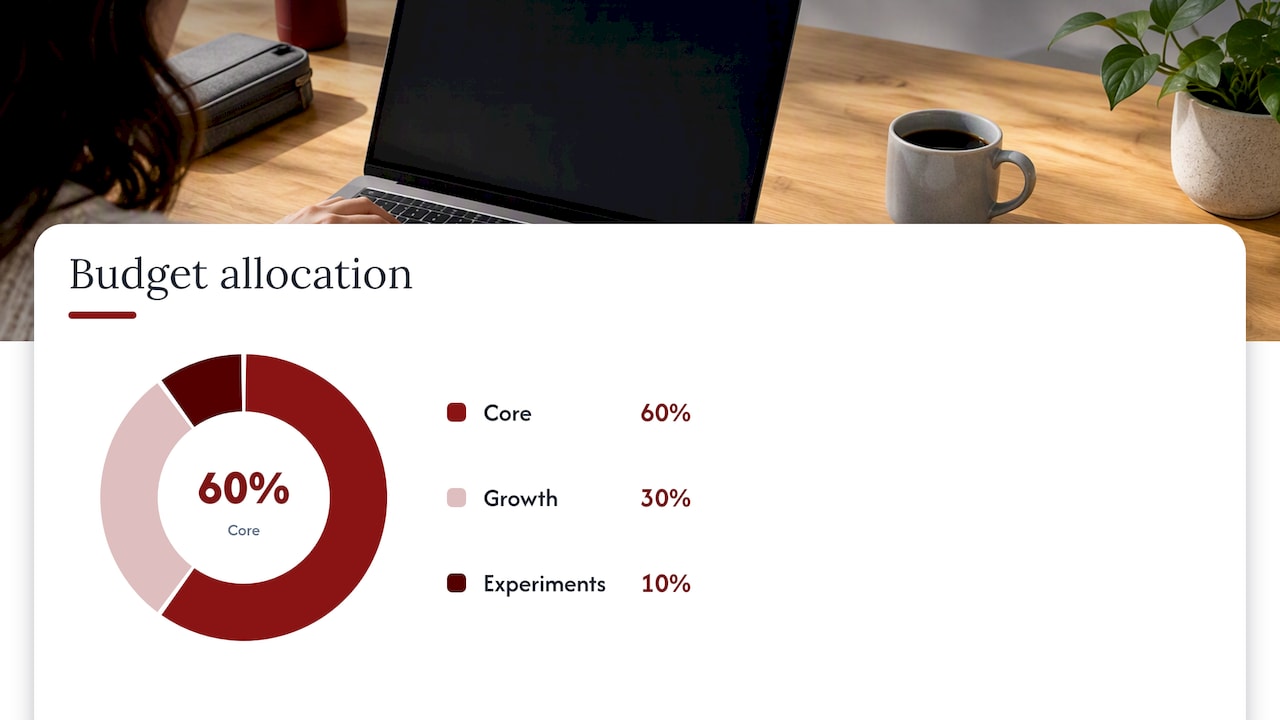
Spreading budget across a few buckets protects your core performance while still leaving room to find new growth. A suggested split is 60% to proven, core campaigns, 30% to growth or expansion efforts such as new keyword themes or audiences, and 10% to experiments you’re willing to lose.
Review that split weekly and move money toward what’s working.
- Use campaign total budgets or seasonality adjustments for short, high-impact events like flash sales or product launches, since those give Google’s systems a heads-up when historical data won’t predict the spike.
- Increase budget on campaigns holding a consistent, positive ROAS or conversion rate over at least a week or two of data.
- Pause or reassign budget away from campaigns that consistently miss target CPA, rather than letting them drain spend on hope.
- Tighten ad scheduling, narrow audience targeting, and prioritize your best-converting keywords to cut waste before adding more budget.
Google’s planning and forecasting tools
Before locking in a number, run it through Google’s own forecasting tools rather than guessing.
- Performance Planner builds a forecast of conversions and spend across your campaigns and can model how reallocating budget between them might change results, based on historical and auction data.
- The Google Ads Cost Tool gives industry-level benchmarks so you can sanity-check a proposed budget against what similar businesses typically spend.
- Review your campaign’s spend and pacing in Google Ads to spot when delivery differs from your expectations.
Setting budgets for remarketing campaigns
Remarketing campaigns target people who already visited your site or engaged with your brand. The audience size and intent can vary. Budget needs depend on audience size, campaign goals, and costs. Estimate spend using your own audience and campaign data.
Start by sizing your remarketing budget to your actual audience volume. A small list of a few hundred recent visitors doesn’t need a large daily cap, since there’s a ceiling to how many impressions and clicks that audience can generate regardless of spend. As your remarketing lists grow through more site traffic or a longer lookback window, you can raise the daily budget to keep pace with the larger pool.
Conversion rates can differ between remarketing and prospecting, so compare campaign results before deciding whether to adjust your target CPA or ROAS. The campaign has more room to bid competitively for an audience already close to a decision. Keep remarketing on its own budget line rather than folding it into a shared pool with prospecting campaigns, so a sudden audience shrink or spike doesn’t quietly starve or flood your other efforts.
How an agency actually builds and manages a client’s budget
Budgeting shouldn’t start with a number: it starts with a test budget to validate real CPC and conversion rate. We start new clients with a modest test budget to validate real CPC and conversion rate before committing to a scale-up figure. Tracking and landing pages get fixed first, since no budget increase helps a campaign that can’t measure or convert what it already sends.
— Will
Let us set and manage your Google Ads budget
Getting the math right is only half the job. We bring budget planning, bid strategy, and transparent performance reporting together, so the number you land on actually turns into leads or sales instead of sitting unspent or overspent. Our Google Ads and Pay-Per-Click service covers campaign management, conversion tracking, and ongoing adjustments as your results come in.

If your current spend feels like a guess, we’ll review it and tell you plainly what’s working and what isn’t; request a Google Ads budget review and get a plan built around your actual numbers.
FAQ
What should my budget be for Google Ads?
Your budget should come from your target cost per acquisition or ROAS, divided through expected clicks and conversion rate, rather than a flat industry number. Convert the resulting monthly figure into a daily budget by dividing by 30.4, and confirm it with Performance Planner before launch.
Is $20 a day good for Google Ads?
A modest daily budget can work for a narrow, low-competition niche or a small remarketing audience, but it can be tight for most competitive search campaigns. Whether it’s enough depends entirely on your average CPC and target conversion volume, which you can check using the math outlined above.
Is $10 a day enough for Google Ads?
$10 a day is usually only workable for very low-CPC markets or small remarketing lists with limited audience size. For most search campaigns with average CPCs of several dollars, that budget buys too few clicks a month to generate a reliable conversion signal.
Why isn’t Google Ads spending my budget?
A campaign can underspend when bids are too low to win auctions, targeting is too narrow, or ad scheduling limits the hours delivery can occur. New campaigns also tend to ramp up gradually, so light early spend doesn’t necessarily signal a problem.