
5 Campaign Ready Responsive Search Ads Examples for Marketers
Responsive search ads are Google text ads that combine multiple headlines and descriptions into ad combinations, testing which mix earns the most clicks for each search. This article gives you five ready-to-use RSA templates, plus the exact character limits, pinning rules, and optimization steps Google’s system rewards. Build any of these five and you’ll launch with a stronger starting point than most advertisers get on their first try.
TL;DR:
- Using 8 to 15 unique headlines and 2 to 4 descriptions increases the number of effective ad combinations, boosting performance and testing efficiency.
- Avoid over-pinning headlines, as excessive locking reduces Google’s ability to test diverse message variations and lowers Ad Strength scores.
- Ensure ad groups are tightly themed around one service or product to maintain relevance and prevent mixed messaging that weakens ad impact.
- Regularly monitor asset performance reports to replace “Low” rated headlines and optimize combinations for higher clicks and conversions.
- Starting with benefit-driven headlines, rather than keyword stuffing, yields greater conversion lift and overall campaign effectiveness.
Table of Contents
- Responsive Search Ads Examples for Five Common Campaign Goals
- Responsive Search Ad Specs and Character Limits
- Best Practices for Writing Responsive Ads That Perform
- How to Create a Responsive Search Ad in Google Ads
- Testing and Optimizing Your RSAs After Launch
- Common RSA Mistakes to Avoid
- How Dot Xero Builds and Manages RSAs for Clients
- What to Test First if You’re Starting From Scratch
- Get Your RSAs Set Up by People Who Manage Them Daily
- Sources
- FAQ
Responsive Search Ads Examples for Five Common Campaign Goals
Google assembles headlines and descriptions into different combinations and shows searchers whichever version its system predicts will perform best. That means every headline you write has to survive being read alone, next to any other headline, in any position. The five templates below are built around that constraint.
1. Ecommerce (product category page)
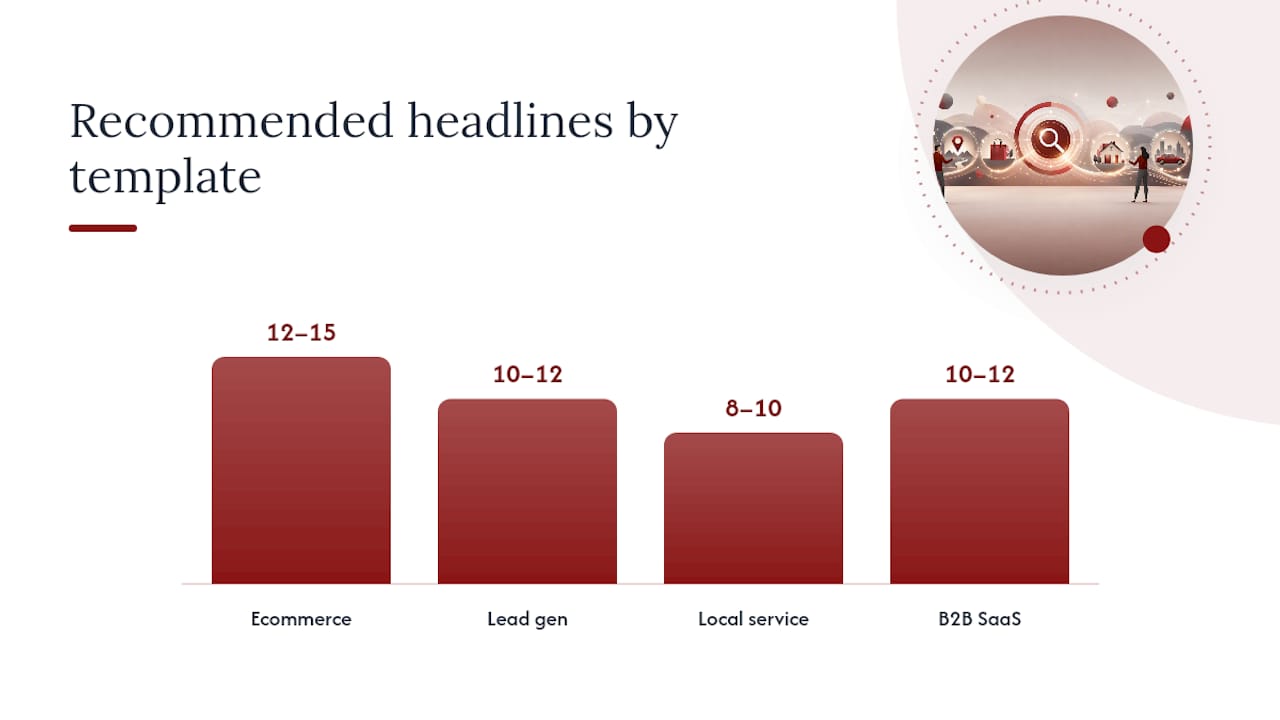
Aim for 12 to 15 headlines and 4 descriptions. Group headlines by type so you’re not accidentally writing the same message eight different ways:
- Benefit: “Free Shipping On All Orders,” “Shop Styles You’ll Actually Wear”
- Feature: “Sizes XS to 3XL Available,” “New Arrivals Weekly”
- Trust: “Rated 4.8 Stars by Shoppers,” “30-Day Easy Returns”
- Urgency: “Sale Ends Sunday Night,” “Only a Few Left in Stock”
- CTA: “Shop the Collection Now,” “Browse New Arrivals”
Sample combination: “Free Shipping On All Orders | Shop the Collection Now | Rated 4.8 Stars by Shoppers.” Description: “Discover new arrivals every week. Easy 30-day returns and free shipping on every order.”
Pro Tip: Pull your benefit headlines straight from customer reviews using the Google Ads Generator: RSA Headlines & Descriptions | AmmarAI to quickly produce many unique asset variations. Real phrases like “fits true to size” outperform generic marketing copy because they sound like something a buyer would actually say.
2. Lead generation (home services quote request)
Use 10 to 12 headlines and 3 descriptions, weighted toward trust and urgency since the reader hasn’t committed to buying yet:
- Benefit: “Free In-Home Estimates,” “No Obligation Consultation”
- Feature: “Licensed and Insured Techs,” “Same-Week Appointments”
- Trust: “Over 500 Local Reviews,” “Family-Owned Since 2007”
- Urgency: “Book Before Prices Rise,” “Limited Slots This Month”
- CTA: “Get Your Free Quote,” “Schedule a Visit Today”
Sample combination: “Free In-Home Estimates | Licensed and Insured Techs | Get Your Free Quote.”
3. Local service business (near-me searches)
This template needs 8 to 10 headlines and 2 to 3 descriptions, with at least two headlines carrying your city or neighborhood name so the ad reads as genuinely local:
- Benefit: “Fast, Reliable Local Service,” “Same-Day Appointments Available”
- Feature: “Serving [City] for 15+ Years,” “Emergency Service Available”
- Trust: “5-Star Rated on Google,” “Locally Owned and Operated”
- CTA: “Call Now for Service,” “Get a Free Quote”
4. B2B SaaS (demo request)
B2B buyers research longer, so lean on specificity: 10 to 12 headlines and 3 descriptions emphasizing clear, specific details.:
- Benefit: “Cut Reporting Time by Half,” “Automate Your Weekly Reports”
- Feature: “Integrates With Salesforce and Slack,” “No Code Required to Set Up”
- Trust: “Trusted by 2,000+ Teams,” “SOC 2 Type II Certified”
- CTA: “Book a Free Demo,” “See It in Action”
5. Events (ticket sales or registration)
Events run on a countdown, so urgency headlines carry more weight here than in any other template. Use 10 headlines and 2 to 3 descriptions:
- Benefit: “Network With Industry Leaders,” “Hands-On Workshops Included”
- Feature: “Two Full Days of Sessions,” “Keynotes From Top Speakers”
- Urgency: “Early Bird Pricing Ends Friday,” “Only 200 Seats Left”
- CTA: “Register Now,” “Save Your Seat Today”
Every one of these five templates works because no single headline depends on the one next to it. Swap any two and the ad still reads clean, which is exactly the flexibility Google’s matching system needs.
Responsive Search Ad Specs and Character Limits
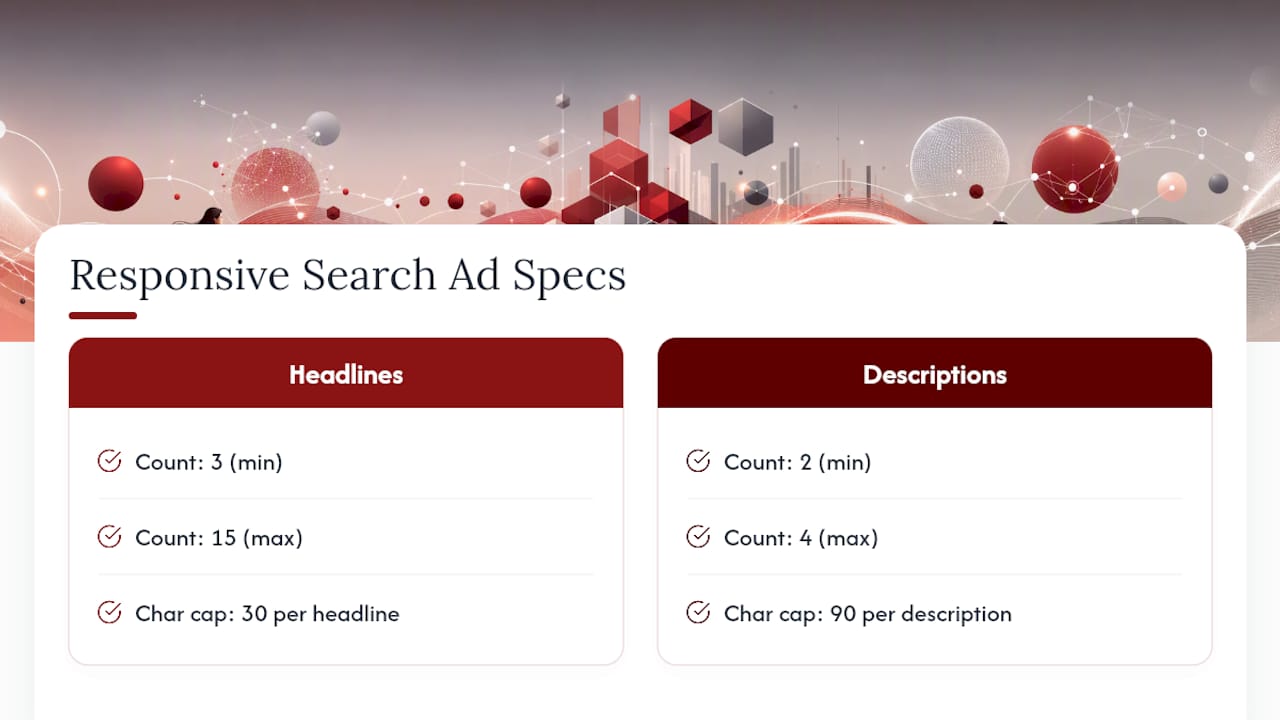
Google’s format has firm minimums and maximums, and missing them by even one character will bounce your ad back for edits. Google Ads Help specifies a minimum of 3 headlines and a maximum of 15, each capped at 30 characters. Descriptions run from a minimum of 2 up to 4, each capped at 90 characters.
You don’t need to hit 15 headlines to publish an ad, but you do need enough variety for the system to test meaningfully, which is why Google recommends providing a sufficient number of headlines and descriptions to improve ad performance. (https://support.google.com/google-ads/answer/12159142?hl=en-GB) rather than the bare minimum.
Google decides which headlines and descriptions to show together, in what order, and how many to display, based on the search query, device, and past performance signals. Unused headline or description text can sometimes appear as other ad assets, like sitelinks, if it’s relevant enough. Pinning a headline to a specific position (like position 1) locks that text in place, but it does not guarantee the ad will always show with that pin filled. It guarantees only that if a headline shows in that slot, it will be the one you pinned.
Best Practices for Writing Responsive Ads That Perform
Write every headline so it makes sense standing alone, with no dangling pronouns or half-finished thoughts that only work next to a specific neighbor. “That work for you” as a headline means nothing on its own; “Flexible Scheduling Available” does the same job and survives isolation.
Supply 8 to 15 genuinely unique headlines per ad, not eight variations of the same sentence. Google’s own guidance is explicit here: include keywords in a couple of headlines for relevance, but balance them with several benefit-driven headlines that don’t repeat a keyword at all. An ad built entirely from keyword-stuffed headlines reads like a robot wrote it, and it tests poorly against ads with a mix of tones.
Pinning should be the exception, not the default. Locking headlines into fixed positions reduces the number of combinations Google can test, and practitioners who track Ad Strength consistently report that over-pinned ads score lower. Pin only what’s legally required (a licensing disclaimer, a regulated claim) or a brand element you genuinely can’t afford to lose. A hybrid approach, pinning one or two critical lines and leaving the rest open, tends to balance control with performance better than an all-or-nothing approach in either direction.
Ad Strength and results: Advertisers who improve their Ad Strength rating tend to see increased clicks and conversions, on average. (https://support.google.com/google-ads/answer/12159142?hl=en-GB) from the same ad group.
That single stat is why the Ad Strength meter deserves more attention than most advertisers give it. Beyond the score itself, check:
- Headline count and diversity (aim for the full range, not the minimum)
- At least one description under 90 characters that stands fully on its own
- No two headlines saying functionally the same thing
- Minimal pinning, ideally none on launch
Pro Tip: Write your headlines in a spreadsheet first, one per row, then read down the column out loud. If two rows sound interchangeable, cut one and write something genuinely different instead.
How to Create a Responsive Search Ad in Google Ads
Before you touch the ad builder, get your ad group structure right. Every ad group should have at least one responsive search ad, and that ad group should be built around a single tight theme, not a broad mix of unrelated keywords. A grouping that mixes “emergency plumber” with “kitchen remodel” forces your headlines to serve two different searcher intents at once, which weakens both.
Once your ad groups are organized, follow this sequence:
- Open the ad group and select “Responsive search ad” as the ad type.
- Enter your final URL and, if relevant, a display path that reflects the landing page content.
- Add your headlines, grouped mentally by type (benefit, feature, trust, urgency, CTA) even though Google won’t ask you to label them.
- Add your descriptions, making sure at least two can stand completely independent of any headline.
- Use the ad preview panel to check how different combinations read together.
- Pin only the lines that legally or structurally must appear (skip this step if nothing qualifies).
- Check the Ad Strength score before saving. Anything below “Good” means you’re launching with fewer combinations than the system can actually test.
- Save the ad and confirm the final URL is unique to that ad group, not duplicated across others.
Skipping step 7 is the most common shortcut advertisers take, and it’s the one that costs the most in the first few weeks of a campaign.
Testing and Optimizing Your RSAs After Launch
The asset-level performance report is where the real optimization work happens. Google rates each headline and description as “Low,” “Good,” or “Best” based on how often it appears in combinations that perform well. Check this report weekly for the first month, then every two weeks once a campaign stabilizes.
Metrics worth tracking beyond the standard click-through rate:
- Conversion rate by combination, not just by ad
- Cost per conversion trends as you swap underperforming assets
- Asset-level “Low” ratings that persist across multiple weeks
- Overall Ad Strength movement after each round of edits
Run structured experiments rather than guessing. A useful A/B test pits a fully unpinned ad against a version with one or two pins on your strongest brand message, then measures conversion volume over at least two to four weeks per side. One case study Combining Smart Bidding with broad match keywords and RSAs has produced notable increases in sign-ups and clicks, illustrating the value of integrating creative testing with automated bidding. This shows how much creative testing and automated bidding can compound when paired instead of run in isolation.
Replace any headline rated “Low” for three straight weeks. Don’t wait for it to recover; a persistently weak asset drags down every combination it appears in, even when your best headlines are strong. Adding a second RSA to a well-performing ad group can add incremental conversions too, though the gains taper off fast, so treat a third or fourth RSA per ad group as a test, not a default move.
Common RSA Mistakes to Avoid
Most underperforming RSAs share the same handful of problems, and each one is fixable in minutes once you spot it.
- Repetitive headlines: Writing five versions of “best prices in town” wastes slots the system could use to test genuinely different messages.
- Over-pinning: Locking six or seven headlines into fixed positions defeats the purpose of a responsive format; unpin all but the essentials and let the system test again.
- Loosely themed ad groups: If your keywords span multiple unrelated services, your headlines can’t stay relevant to all of them at once. Split the group.
- Ignoring Ad Strength prompts: The recommendations panel tells you exactly what’s missing. Skipping those suggestions for weeks is the single easiest way to leave performance on the table.
How Dot Xero Builds and Manages RSAs for Clients
A specialized online marketing agency has managed Google Ads accounts since 2007 for businesses across various industries including law firms, jewelers, and contractors in Las Vegas. The RSA process starts with a discovery phase to pin down what a client’s customers actually search for, then moves into drafting a full set of headlines and descriptions across the benefit, feature, trust, and urgency categories covered above.
From there, Dot Xero runs structured A/B experiments comparing pinned and unpinned variations, tracking which combinations move the needle on conversions rather than just clicks. Clients receive transparent reporting that shows which assets perform better and which need changes, with recommendations based on actual account performance instead of generic templates.
What to Test First if You’re Starting From Scratch
If you’re rebuilding an underperforming RSA today, don’t start with pinning or URL structure. Start by adding 6 to 8 non-keyword benefit headlines you haven’t tried before, things that speak to outcomes rather than repeating your target search terms, and measure the conversion lift over four weeks.
This is the highest-leverage change because most advertisers overload their headlines with keywords and starve the benefit-driven ones that actually persuade a reader to click. The keyword headlines earn relevance. The benefit headlines earn the conversion.
— Will
Get Your RSAs Set Up by People Who Manage Them Daily
Building five solid RSA templates is one thing. Keeping them tuned week after week, watching Ad Strength, replacing “Low” rated assets, running the pinned versus unpinned experiments, is a second job most business owners don’t have time for. Dot Xero’s Google Ads management service handles that ongoing work directly, so your campaigns keep improving instead of quietly going stale after the first month.
A first consult starts with an audit of your existing ad groups and asset performance, followed by a prioritized list of what to fix first, whether that’s restructuring loosely themed ad groups, rewriting weak headlines, or unwinding over-pinned ads that are suppressing Ad Strength. If your landing pages need work to match the ads, Dot Xero’s website development team can handle that piece too, so your clicks land somewhere built to convert. Reach out through Dotxero to schedule an audit and see exactly where your current ads are leaving performance on the table.
FAQ
How Do You Create a Responsive Search Ad?
Select “Responsive search ad” in an existing ad group, add your final URL, enter 8 to 15 headlines and 2 to 4 descriptions, preview the combinations, and pin only what’s essential before saving.
How Many Responsive Search Ads Can You Have per Ad Group?
Google allows up to three RSAs per ad group, but every ad group needs at least one, and adding more than one only helps if you’re actively testing distinct messaging angles.
Can You Give Examples of Search Ads?
Yes. A typical RSA combination might show the headline “Free In-Home Estimates,” followed by “Licensed and Insured Techs,” followed by “Get Your Free Quote,” paired with a description explaining the offer. Google assembles thousands of these combinations from the headlines and descriptions you supply.
What Is the Difference Between Dynamic and Responsive Search Ads?
Responsive search ads use headlines and descriptions you write, which Google mixes and matches. Dynamic search ads skip written headlines almost entirely and instead generate them automatically from your website’s content, targeting searches based on page crawl data rather than keywords you’ve chosen.
When Should You Use Responsive Search Ads Instead of Other Formats?
Use RSAs whenever you want Google’s system to test multiple messaging angles automatically, which is nearly every standard search campaign today, since Google’s own guidance treats RSAs as the default text ad format for search campaigns.