Publish One Page Per Location: Location Page SEO for Agencies + SMBs
Location page SEO means building one unique, crawlable page per real branch, office, or legitimately served area, written to satisfy local searchers and support visibility in the Map Pack and local organic results. The single action that matters most: publish one distinct page per location, not a templated city swap. Do it right and you should see more local impressions, more calls, and more direction requests within a few months.
TL;DR:
- Building a location page is only justified if there is a real storefront or service area with distinct search demand for that specific location.
- Each page must include unique content, such as neighborhood details or staff names, to stand out in rankings and avoid penalties for duplicate content.
- Proper SEO entails optimizing titles, URLs, headings, and images with location-specific keywords, ensuring alignment with mobile-first indexing and structured data requirements.
- Link both to and from the main locations directory to signal relevance and prevent orphaned pages that Google may ignore or devalue.
- Regularly track KPIs like impressions, clicks, calls, and directions requests, and iterate based on performance data to improve local visibility and conversions over time.
Table of Contents
- What Is a Location Page and Why Does It Matter?
- Should This Location Page Exist? Decision Criteria
- Essential Components of a High-Performing Location Page
- On-Page SEO Specifics: Titles, URLs, Headings, and Images
- Structured Data, Google Business Profile, and Maps Integration
- Avoiding Doorway Pages and Managing Duplicate Content
- Building a Repeatable Process for Scaling Location Pages
- Measuring and Iterating: KPIs, Tools, and Cadence
- How Dot Xero Applies These Principles for Local Clients
- Ready to Fix or Build Your Location Pages?
- Sources
- FAQ
What Is a Location Page and Why Does It Matter?
A location page is a dedicated URL representing one physical branch, office, or service area, built to answer the questions a nearby customer actually has before they call or drive over. It carries its own address or service description, its own hours, its own photos, and enough unique text that Google treats it as a real destination rather than a clone.
These pages do two jobs at once. They feed the Map Pack, where Google decides which three local listings deserve the top spot for a “near me” search, and they feed local organic results, where a well-built page can outrank a homepage for city-specific queries. Local SEO work like this rests on keyword research, accurate business details, reviews, and internal linking working together, not any single tactic in isolation.
Multi-location retailers need this most obviously. A jeweler with stores in three parts of a metro area loses customers every day its Henderson store and its Summerlin store share one generic “contact us” page. But service-area businesses need it just as badly. A plumber who drives to customers rather than hosting them has no storefront, yet still needs a page that proves coverage of a specific neighborhood.
Every visitor lands with the same short list of questions: What do you offer here? Where exactly are you? When are you open? How do I get there? And can I trust you? A location page that fails to answer all five in the first screen loses the visitor to a competitor’s listing, even if it ranks first.
Should This Location Page Exist? Decision Criteria
Not every city deserves its own URL. Publishing a page for a place where you have no staff, no service history, and no real customer interaction is exactly the pattern Google’s spam policies target when they warn against mass-producing similar regional pages built mainly to capture search traffic.
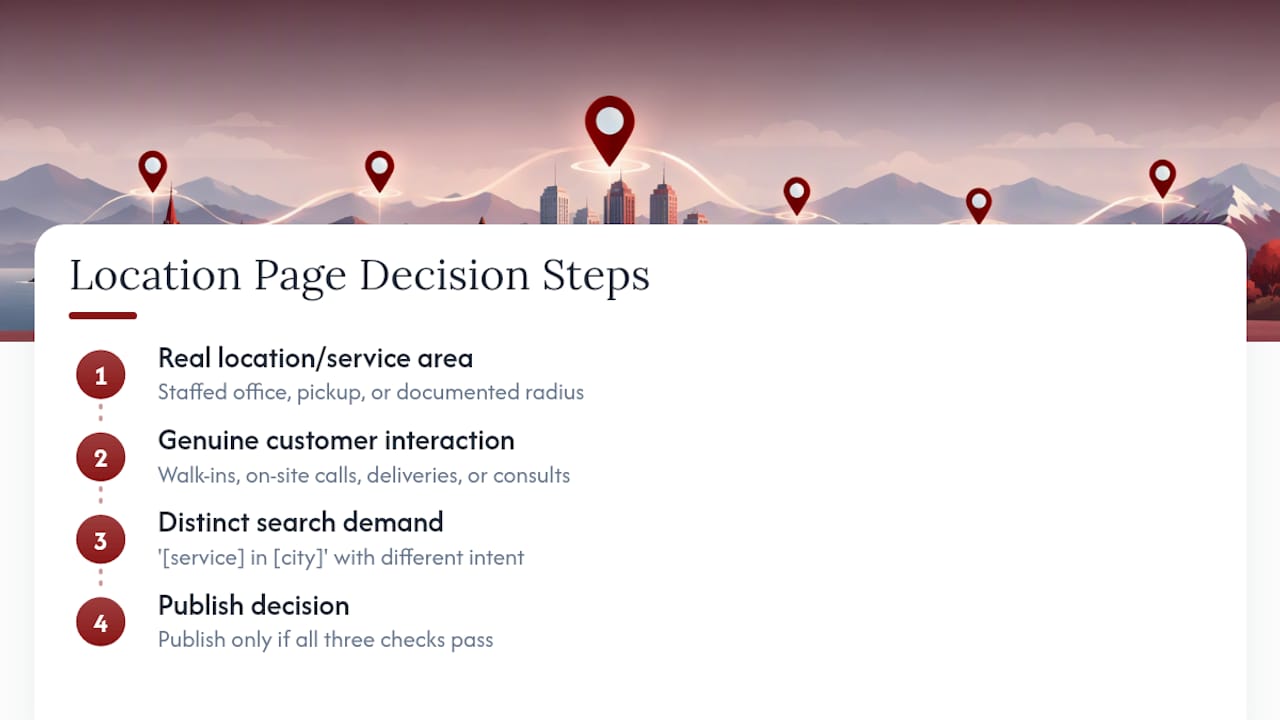
Ask three questions before you build anything.
Is there a real location or service area behind the URL? A staffed office, a warehouse with pickup, or a documented service radius all qualify. A city you have shipped to twice does not.
Do customers actually interact there? Interaction can mean walk-ins, on-site service calls, local delivery, or scheduled consultations. If the honest answer is “we’d like more business there,” that is a marketing wish, not a location.
Does the URL serve distinct search demand? Check whether people search “[service] in [city]” with different intent than your main service page already covers. If the search volume and intent barely differ from your flagship location, a directory listing or a mention on an existing page beats a thin new URL.
Storefront businesses generally warrant a dedicated page per address. Service-area businesses often do better with one page per legitimately covered region, sized to match how Google Business Profile lets you define up to 20 service areas by city or postal code. When in doubt, a single strong regional page with an honest coverage list beats five thin pages that all say the same thing with the city name swapped.
Essential Components of a High-Performing Location Page
Every element on the page should answer a real question a searcher or a search engine has, not just fill a template slot. Google’s own guidance on LocalBusiness structured data lists the properties that make a page eligible for rich results, and those same fields double as the content a human visitor needs to see anyway.
A location page built for both audiences typically includes:
- A crawlable street address, or a clearly written service-area statement if there is no public storefront
- A local phone number, formatted consistently with your Google Business Profile listing
- Accurate hours of operation, including holiday exceptions where they matter
- An embedded map with driving directions or transit notes
- Original photos of the location, staff, or completed local work, not stock imagery
- Location-specific reviews or testimonials, pulled from real customers at that branch
- A clear call to action: book, call, or get directions, placed above the fold
- A link back to a central locations directory, and a link forward from your main navigation
That last point gets skipped more often than it should. A location page with no path into it from your main navigation or a locations hub signals to Google that the page is an orphan built for traffic, not for users. Link it both ways: from the directory to the page, and from the page back to the directory and to relevant service pages.
The description itself needs to say something a competitor three miles away could not copy and paste. Mention the specific neighborhood, a nearby landmark customers use for directions, a parking quirk, or a service variation unique to that branch. According to Moz’s research on location page construction, the pages that hold rankings long term are the ones with genuinely local detail, staff names, or neighborhood anecdotes, not the ones that changed a city name in an otherwise identical template.
On-Page SEO Specifics: Titles, URLs, Headings, and Images
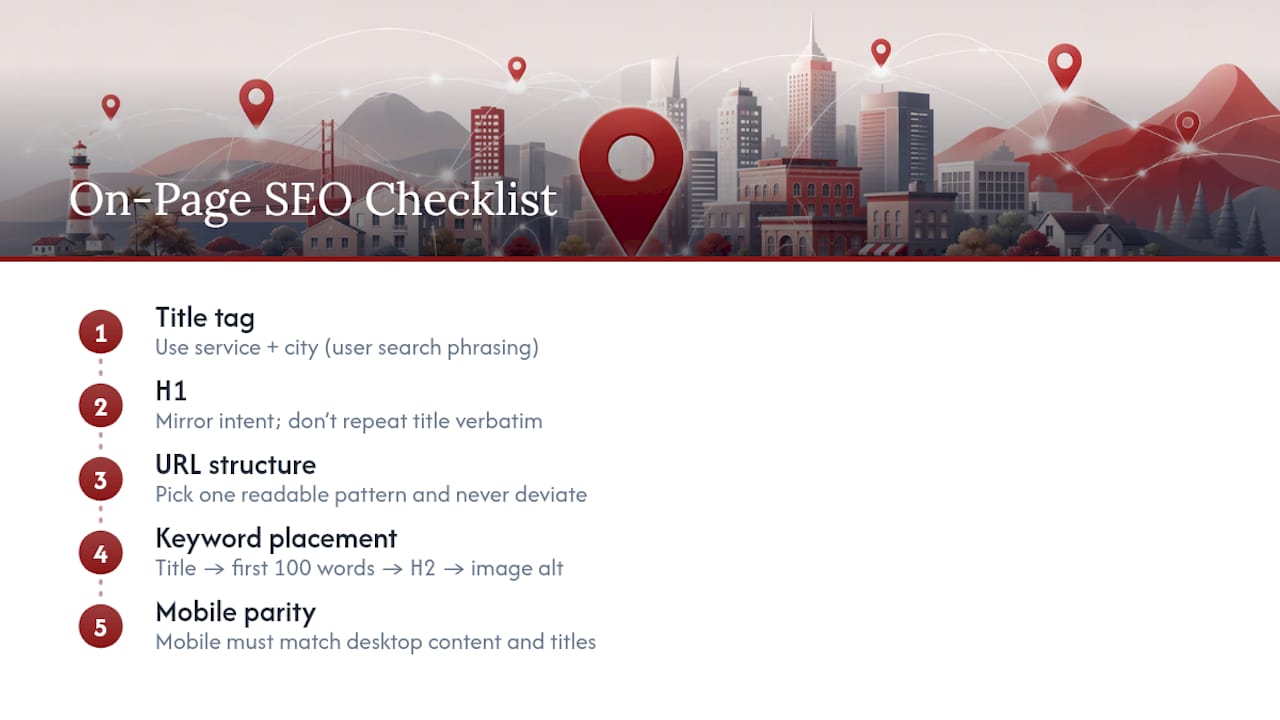
Metadata is where most location pages quietly fail. A title tag like “Las Vegas Location | [Business Name]” tells a search engine almost nothing about what happens at that address. Write titles that name the service and the modifier together, in language a human would actually type: “Emergency Plumbing Repair in Henderson, NV | [Business Name]” beats a generic city label every time.
Your H1 should mirror that intent without repeating the title tag word for word. If the title is service-plus-city, the H1 can lead with the neighborhood or a specific benefit, then confirm the service and location further down the page.
URL structure matters more for long-term maintenance than for immediate rankings, but pick one pattern and never deviate. A structure like /locations/henderson/ for storefronts, or /locations/henderson/plumbing-repair/ when you serve multiple services per area, stays readable and scales cleanly as you add branches. Mixing patterns across your site (some pages under /locations/, others under /service-areas/, others buried in blog categories) confuses both users and crawlers.
Keyword placement follows a simple hierarchy: title tag, first 100 words of body copy, at least one H2, and image alt text. That is the extent of where it needs to appear. Stuffing the city name into every other sentence reads as spam to a human visitor and does nothing measurable for rankings beyond that natural placement.
Mobile-first indexing means Google evaluates the mobile version of your page as the primary version, so content parity is not optional. Google’s mobile-first indexing guidance requires the mobile page to carry the same primary content, titles, and image information as desktop. A location page that hides the address or drops the reviews section on mobile to save space is invisible to Google on the version that counts most.
Structured Data, Google Business Profile, and Maps Integration
LocalBusiness schema in JSON-LD format is the technical backbone that helps Google parse your location details quickly and consistently. At minimum, include the address, URL, and telephone fields, plus geo coordinates and openingHours where your business has fixed hours.
A few rules keep the markup useful instead of risky:
- Every fact in your JSON-LD must also appear as visible, readable HTML on the page. Markup describing an address or hours that a visitor never sees is exactly what Google’s structured data policies flag as ineligible for rich results.
- If your business is service-area only, use the serviceArea property instead of forcing a fabricated address into the address field.
- Hybrid businesses, meaning a storefront that also travels to customers, can show both an address and a service area, mirroring how Google Business Profile itself handles that combination.
- Add booking actions, order links, or a Maps embed once the basics are solid. These push conversion rate up but do nothing for a page that lacks the fundamentals first.
Schema does not rank a page on its own. As Google’s own introduction to structured data makes clear, markup helps machines understand content that already exists. Accurate, visible information remains the deciding factor in whether a page earns rich results at all.
Avoiding Doorway Pages and Managing Duplicate Content
The fastest way to get a batch of location pages devalued is to publish twenty near-identical pages with the city name swapped and nothing else changed. Google’s doorway guidance exists specifically for this pattern, and once a set of pages gets flagged, recovering rankings across the whole cluster takes months.
Run a quick audit before publishing anything new. Pull up two of your existing location pages side by side and count the sentences that differ. If fewer than a third of the page is genuinely unique to that location, you have a doorway problem waiting to happen.
For pages that are legitimately near-duplicate, meaning two URLs targeting the same intent with only minor variation, use a 301 redirect or a rel=canonical tag to point search engines toward one representative URL. Canonicalization signals your preference, though Google may still choose a different URL as canonical if it judges another version more representative.
Sometimes the right answer is not more pages at all. A directory-style page listing five suburbs you serve, backed by one strong regional page, often outperforms five thin city pages that each struggle to rank on their own.
Building a Repeatable Process for Scaling Location Pages
Scaling past three or four locations without losing quality means separating what stays templated from what must be written fresh every time.
- Map every real location or service area and assign one primary search intent to each URL, so no two pages compete for the same query.
- Lock the template fields: address format, hours display, phone number, and the schema block, so these stay consistent across every page.
- Write the unique fields by hand: a neighborhood detail, a staff name, a local testimonial, or a service nuance specific to that branch.
- Build a content brief covering target keywords, required images, Google Business Profile sync, schema fields, the canonical URL, and internal links before a single word gets written.
- Publish and QA against the brief, checking that visible content matches the JSON-LD exactly and that the page links to and from your locations directory.
Strong internal linking between location pages and your core service pages also helps Google understand the relationship between your hub content and each branch. A guide to internal linking strategy is worth reviewing if your site’s link structure has grown organically without a plan.
Pro Tip: Keep a shared spreadsheet listing every unique fact you have used per location page (staff names, neighborhood details, parking notes) so you never accidentally repeat the same “local” detail across two different cities.
Measuring and Iterating: KPIs, Tools, and Cadence
Track key performance indicators for every location page, such as impressions, clicks, phone calls, direction requests, and completed bookings or form submissions. Impressions and clicks come from Search Console filtered by URL. Calls and direction requests come from Google Business Profile insights. Bookings and conversions come from your own analytics setup, tied back to that specific landing page.
A simple cadence keeps the work from stalling:
- First 30 days: confirm indexing, check that Search Console shows impressions for local queries, and fix any schema errors
- Day 60: test one metadata variable, such as the title tag or meta description, if click-through rate looks weak against impressions
- Day 90: evaluate whether CTA placement or added review snippets moved calls and direction requests, and roll the winning change out to comparable pages
Pages with high impressions but low clicks usually have a metadata problem. Pages with decent clicks but few calls usually have a trust or CTA problem on the page itself, not a ranking problem.
How Dot Xero Applies These Principles for Local Clients
Dot Xero has worked with Las Vegas businesses on local visibility since 2007, which means watching Google’s local algorithm shift through more than a decade of updates. That history shapes a practical rule: every location page audit starts with the same question this article raises first, whether a real location or service area actually justifies the URL.
A typical build follows the workflow above closely. Map the client’s real locations, confirm Google Business Profile alignment, write unique content per branch, implement LocalBusiness schema, then connect everything to a locations directory before publishing. Case studies and client results specific to individual industries, from law firms to jewelers, are available on request during a consultation.
Ready to Fix or Build Your Location Pages?
Dot Xero is the alternative to guessing your way through location page SEO alone. Rather than handing you a generic template and walking away, Dot Xero builds custom pages tied to your actual Las Vegas locations, backed by the same structured-data and content-uniqueness standards covered in this article.

The process starts with an audit: reviewing your existing pages for doorway risk, checking whether your schema matches your visible content, and confirming your Google Business Profile is aligned with what each page actually says. From there, the work gets prioritized by impact, meaning the pages losing the most calls and direction requests get fixed first, not whatever is easiest to touch.
Beyond the page itself, Website Development work ensures your location templates are mobile-first from the build stage rather than patched later, and Google Ads support can amplify a new location page while it climbs organic rankings. If you want a team that has watched local search evolve since 2007 handle the technical details, request a location-page audit through Dot Xero’s SEO services and get a prioritized list of what to fix first.
Sources
FAQ
What Are Location Pages in SEO?
A location page is a dedicated URL built for one real business location or service area, containing crawlable address or service-area details, hours, phone number, and unique local content. It exists to satisfy local search intent and support visibility in both the Map Pack and local organic results.
What Is the 80/20 Rule in SEO?
For location pages specifically, that often means prioritizing the branches or service areas with the highest search demand first, rather than launching every city page at once.
How Do You Create a Location Page?
Start by confirming the location or service area is real and generates distinct search demand, then build a page with a unique title, H1, address or service-area statement, hours, photos, reviews, and a clear call to action. Add LocalBusiness structured data matching the visible content, link it to your locations directory, and sync everything with your Google Business Profile.
Do Landing Pages Affect SEO?
Yes. A well-built location landing page can rank directly in local organic results and influence Map Pack visibility, while a thin or duplicated one can trigger doorway page issues that hurt the whole cluster of pages. Local visibility also depends on external signals like citations and reviews working alongside the page itself, according to Moz’s local SEO guide.
Does Dot Xero Build Location Pages for Local Businesses?
Dot Xero builds custom location pages as part of its SEO services and website development work for Las Vegas businesses. Pricing is not published and is provided after a consultation based on the number of locations and scope of work.