
Instagram Reels Ads: Performance Playbook for Marketers (2026)
Instagram Reels ads are full-screen, vertical sponsored videos that surface directly in the Reels feed, built for discovery rather than deliberate browsing. They work best at the top of the funnel, when you’re introducing cold audiences to a product they weren’t already searching for. The immediate move: build native, hook-first 9:16 video and launch it through Meta Ads Manager, not the in-app boost button, so you can actually measure what it does.
TL;DR:
- Reels ads should target broad cold audiences with large interest or lookalike segments to maximize discovery, as narrow targeting often hampers delivery.
- Keep creative variations flowing by producing 15 to 25 new assets monthly and refreshing ads every 3 to 7 days to combat creative fatigue.
- Using a 7-day click, 1-day view attribution window and monitoring hook rate, CTR, and ROAS provides the most reliable performance signals.
- Campaigns should start with a low-cost bid strategy for at least two weeks, then gradually increase budgets by 20% every 48 to 72 hours after hitting performance targets.
- Rely on Ads Manager rather than only boosting reels from the app, to access structured testing, pixel tracking, and detailed targeting control.
Table of Contents
- What Are Instagram Reels Ads and What Specs Do They Require?
- How Do You Set Up a Reels Ad in Meta Ads Manager?
- What Creative Rules Actually Improve Hook and Completion Rates?
- What Audience Strategy Works Best for Reels Placements?
- Which Metrics Actually Signal Reels Ad Performance?
- What’s a Realistic Testing and Scaling Schedule?
- How Does an Agency Turn This Into a Running Campaign?
- Reels Ads vs. Other Ad Formats: Weighing the Trade-Offs
- A Sample Campaign Setup From Objective to Bid Strategy
- Ads Manager or Boosting: Which Fits Your Goal?
- How Do You Build Effective CTAs Into Reels Ads?
- What Should You Look for in a Reels Ads Agency or Managed Service?
- When Should a Business Prioritize Reels Ads?
- Ready to Put a Reels Ad Program in Motion?
- Sources
- FAQ
What Are Instagram Reels Ads and What Specs Do They Require?
Reels ads have to fit Meta’s technical rulebook or risk cropping, rejection, or a UI overlay eating your call to action. The format runs at a 9:16 aspect ratio, with a recommended resolution of 1080×1920 or 1440×2560. Files need to be MP4 or MOV, encoded with the H.264 codec and AAC audio, capped at 4 GB, according to Meta’s Awareness Video Ad Specs for Instagram Reels.
Duration is flexible, but performance data points to a sweet spot. Most advertisers see the best results between 6 and 30 seconds, with 15 seconds working well for direct-response offers that need a fast close.
Reels ads run in three main spots: the native Instagram Reels feed, Facebook Reels, and through Advantage+ placements, where Meta’s system decides how much budget goes to each surface based on where it predicts the best results. Manual placement selection sacrifices some efficiency but gives you cleaner data on how Reels specifically perform against your other formats.
By the numbers: Marketer adoption of short-form video formats like Reels has grown fast enough that Statista now tracks it as a standalone category in influencer and paid social research, a signal that the format has moved from experimental to expected.
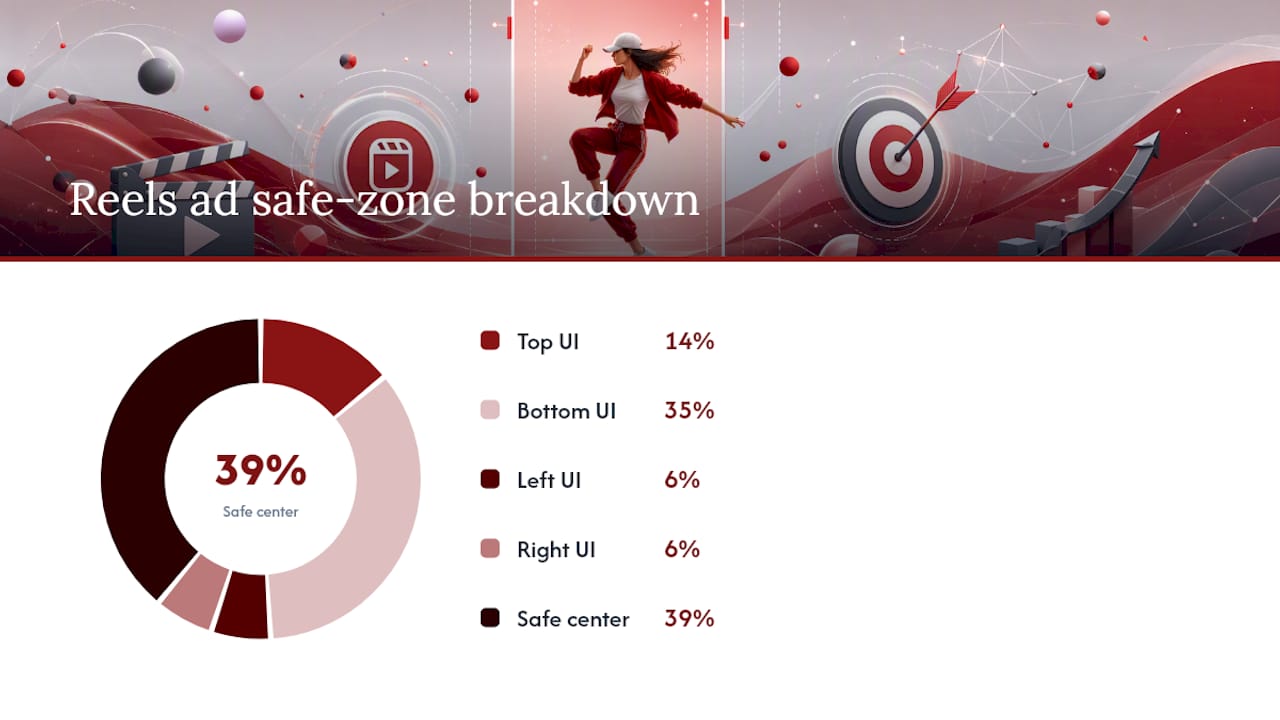
Safe-zone placement is non-negotiable. Instagram’s UI overlays cover roughly the top 14%, the bottom 35%, and about 6% on each side, so text, logos, and CTAs need to live in that center strip or they’ll sit under a profile icon or caption bar, per Meta’s Reels ads guidance.
Key specs at a glance:
- Aspect ratio: 9:16, full vertical frame
- File format: MP4 or MOV, H.264 codec, AAC audio
- Max file size: 4 GB
- Sweet-spot duration: 6 to 30 seconds (15 seconds for direct response)
- Safe zone: keep text and logos out of the top 14%, bottom 35%, and outer 6% on each side
How Do You Set Up a Reels Ad in Meta Ads Manager?
Start with the objective, because it shapes everything downstream. If you’re chasing revenue, choose Conversions or Catalog Sales so Meta’s delivery system optimizes toward purchase events. If you’re still testing creative concepts or building awareness, Traffic or Engagement objectives give you cheaper data to learn from before you commit real budget to a sales goal.
The setup breaks into three levels:
- Campaign level: Pick your objective and, if relevant, turn on Advantage+ campaign budget to let Meta shift spend across ad sets automatically.
- Ad set level: Choose manual Reels placement or Advantage+ placements, set your daily budget, select a bid strategy (lowest cost is the default for most testing phases), define your audience, and confirm your pixel or Conversions API events are firing correctly.
- Ad level: Upload your 9:16 creative, toggle on the Safe Zone preview to check text placement, write primary text that front-loads the offer in the first 44 characters or so (that’s roughly what shows before “see more” truncates it), pick your CTA button, and verify your tracking parameters before you publish.
According to Meta’s own guidance on creating ads that link to Instagram videos or Reels, Ads Manager is the only path that gives you full targeting control, pixel-based retargeting, and structured A/B testing.
Boosting a Reel from the Instagram app still has a place. It’s fast when you need quick reach on an organic post that’s already performing, and it doesn’t require any Ads Manager setup. But it comes with real limits: no custom audience retargeting off your pixel, no rigorous split testing, and far fewer targeting levers, as Meta notes in its own Boost an Instagram Reel documentation.
Pro Tip: Set your ad set’s tracking to a 7-day click, 1-day view attribution window before launch. Changing it mid-flight resets the learning phase and throws out data you’ve already paid for.
What Creative Rules Actually Improve Hook and Completion Rates?
The first 1.5 to 3 seconds decide whether someone keeps watching or swipes past. A useful structure to build around: a hook in the first 3 seconds, a demonstration or clear benefit from 3 to 12 seconds, then a CTA or proof point to close it out.
Native, UGC-style footage tends to outperform polished commercial production in cold-audience discovery, since it looks like the content people are already scrolling through rather than an ad interrupting it. Save your higher-production assets for retargeting audiences further down the funnel who already know your brand and expect something more refined.
A few production habits matter more than they get credit for:
- Burn captions directly into the video. Reels default to sound-on, but plenty of people still scroll with audio off, and captions protect completion rates either way.
- Use Meta’s Sound Collection or original audio; licensed commercial music you don’t have ad rights to can get your ad rejected or pulled.
- Edit for a loop. If your final frame flows naturally back into your opening frame, viewers who watch twice count as a stronger completion signal.
- Keep every important visual and text element inside the safe zone described above.
Volume matters as much as any single video. Practitioner benchmarks recommend running 15 to 25 creative variations per month for campaigns serious about profitability, with a floor of 3 to 5 active creatives per ad set at any given time to avoid the audience seeing the same clip too often.
Pro Tip: Batch-shoot five hooks in one session, then pair each with two or three different body sections. That single afternoon can produce ten to fifteen distinct ad variations instead of one.

What Audience Strategy Works Best for Reels Placements?
Reels’ distribution model rewards broad targeting more than narrow, and audience strategy should shift depending on how familiar that audience already is with your brand.
- Cold audiences: Keep these large, generally over 1 million people, and build them from interest stacking or lookalike audiences modeled on past purchasers or high-value site events. Reels’ discovery algorithm needs room to find the right viewers within that pool, so overly narrow cold targeting usually backfires.
- Warm audiences: Retarget people who watched 50% or more of a previous Reels ad, or who engaged with your Instagram profile in the last 30 to 60 days. This is where sequential messaging pays off: show a different creative angle than the one that first caught their attention.
- Hot audiences: Cart abandoners, recent website visitors, and CRM lists respond best to conversion-focused creative that leads with the offer, not the brand story.
Exclusions matter as much as inclusions. Layer in frequency caps and exclude recent purchasers or people who already converted, or you’ll burn budget showing the same ad to people who have no reason to act on it twice. A solid grounding in audience-targeting fundamentals helps here, since the underlying logic of interest stacking and lookalike modeling carries over from other paid social platforms into Reels specifically.
Which Metrics Actually Signal Reels Ad Performance?
Hook rate, the share of viewers who watch past 3 seconds, tells you whether your opening frame is doing its job. Thumb-stop rate measures the same idea from a slightly different angle: did the creative stop the scroll at all. From there, track completion rate, click-through rate, cost per mille (CPM), cost per acquisition, and return on ad spend.
Directional benchmarks worth aiming for: a hook rate above 30% suggests your opening is competitive, and practitioner data puts average Reels CPMs around $6.20, typically lower than equivalent feed placements because Reels inventory is still growing faster than advertiser demand for it.
- Low hook rate: the problem is almost always your first 3 seconds. Test a new opening frame before touching anything else.
- Decent hook rate but low CTR: your creative earns attention but your offer or CTA isn’t landing. Rework the message, not the visuals.
- Good CTR but poor ROAS: the traffic is fine but your landing experience or targeting is off. Check post-click conversion rate before blaming the ad.
Set your reporting to a 7-day click, 1-day view conversion window as a default, and build a custom column set in Ads Manager that surfaces hook rate and thumb-stop rate alongside your standard conversion metrics, since neither shows up in the default view.
What’s a Realistic Testing and Scaling Schedule?
Give each ad set $30 to $50 a day at minimum. That’s roughly the floor needed to exit the learning phase with meaningful data inside a week rather than guessing off a handful of impressions.
- Build a testing matrix that crosses hooks, audiences, and CTAs, aiming for at least 3 creative variations per ad set so Meta’s delivery system has real options to optimize across.
- Call a “winner” once an ad clears your CPA or ROAS target with enough spend behind it, generally a few hundred dollars, to trust the number.
- Scale winning ad sets by raising budget around 20% every 48 to 72 hours. Bigger jumps tend to reset the learning phase and reset your cost curve with it.
- Refresh creative every 3 to 7 days once frequency climbs and hook rate starts declining, a pattern Meta’s own performance data associates with creative fatigue setting in.
- Build production into a repeatable batch process: shoot several hooks per session, template your captions and CTA cards, and use editing tools to speed up variation output rather than starting from scratch each time.
How Does an Agency Turn This Into a Running Campaign?
Social media advertising work covers the full Reels ad build: strategy, native creative production, Ads Manager setup, and ongoing measurement and optimization that many in-house teams find difficult to sustain week after week. Running 15 to 25 creative variations a month, tracking hook rate against CTR, and adjusting bids without resetting the learning phase is a full-time job when it’s done right, and that’s exactly the gap an experienced team closes for businesses that need results without hiring a full internal media department.
Reels Ads vs. Other Ad Formats: Weighing the Trade-Offs
Reels ads win on reach and cost efficiency for cold audiences. CPMs tend to run lower than feed or Stories placements, and the format’s discovery-first algorithm puts your video in front of people who’ve never heard of your brand, which is exactly what top-of-funnel campaigns need.
The trade-off is production demand. Reels reward volume and freshness in a way that static image ads and even feed video don’t; a single polished commercial that runs for months in a feed campaign will fatigue fast in a Reels placement. That means Reels ads suit businesses that can commit to a steady creative pipeline more than businesses looking for a “set it and forget it” campaign.
Feed and Stories ads still make sense when you’re retargeting warm audiences with static product shots or carousel formats that don’t need motion to convert. Search-style intent capture, meanwhile, belongs to Google Ads, not Reels. Reels ads don’t compete well against intent-driven formats when someone is already actively searching for your product category. They compete best against other interruption-based discovery formats, where the question is which video earns attention first.
The honest tradeoff: Reels ads generally cost less per thousand impressions and reach more new people, but only reward advertisers willing to keep feeding the system new creative.
A Sample Campaign Setup From Objective to Bid Strategy
A conversion-focused Reels campaign for a Las Vegas retailer might look like this in practice. Start at the campaign level with the Conversions objective, tied to a purchase event already confirmed in the pixel or Conversions API.
At the ad set level, choose a lowest-cost bid strategy for the first two weeks. That gives Meta’s delivery system room to find the cheapest qualified conversions before you introduce a cost cap.
At the ad level, upload three to five 9:16 video variations, each testing a different hook, and confirm the Safe Zone preview shows no overlay conflicts. Write primary text under 44 characters that leads with the specific offer, choose “Shop Now” as the CTA, and double check the UTM parameters match your analytics setup before publishing.
After the campaign exits the learning phase, usually once it logs around 50 conversions, review cost per acquisition against target. If it’s within range, raise the budget by 20% every 48 to 72 hours rather than jumping straight to double spend, which tends to restart the learning phase and lose the delivery efficiency you just built.
Ads Manager or Boosting: Which Fits Your Goal?
The choice comes down to what you’re optimizing for. If the goal is measurable revenue, retargeting, or any kind of structured testing, Ads Manager is the only real option, since it’s the sole path to pixel-based audiences and controlled A/B tests.
Boosting from the Instagram app fits a narrower case: you’ve got an organic Reel that’s already gaining traction, you want to extend its reach quickly, and you don’t need granular targeting or conversion tracking on that specific push. It takes minutes to set up and doesn’t require any campaign structure knowledge, but you’re trading control for speed.
A rough rule that holds up in practice: use boosting for quick visibility plays on content that’s already proving itself organically, and use Ads Manager for anything tied to a revenue target, a retargeting sequence, or a test you actually need clean data from.
How Do You Build Effective CTAs Into Reels Ads?
The CTA in a Reels ad has to do two jobs at once: fit inside the safe zone and show up at the exact moment viewer intent peaks, usually right after the benefit or demo plays out.
Pair your on-screen CTA button, “Shop Now,” “Learn More,” or “Sign Up,” with a verbal or text-based prompt inside the video itself in the final 2 to 3 seconds. Relying on the button alone misses viewers who are watching with sound off and skimming past on-screen buttons they’ve learned to ignore.
Keep the primary text CTA short and specific. If your funnel includes a follow-up sequence, mention it: “Tap to see sizes” sets a clearer expectation than a generic prompt and reduces bounce on the landing page that follows.
What Should You Look for in a Reels Ads Agency or Managed Service?
Not every business has the internal bandwidth to shoot, edit, and refresh 15 to 25 creative variations a month while also managing bids and tracking hook rate against CTR. That’s the point where a managed service or agency partnership usually makes more sense than building an in-house team from scratch.
When evaluating an agency option, look for a few concrete things: proof they set up campaigns in Ads Manager rather than relying on in-app boosting, a clear process for creative production and refresh cadence, transparent reporting on the metrics that actually predict performance (hook rate, CPA, ROAS), and experience across your specific industry rather than a generic template applied to every client. Dot Xero’s social media advertising services build campaigns around exactly that structure, industry-specific creative and Ads Manager execution paired with transparent reporting, for Las Vegas businesses ranging from law firms to jewelers to contractors.
Ask any prospective agency how they handle creative fatigue and refresh timing, since that’s the operational detail that separates campaigns that keep performing from ones that decay after the first two weeks.
When Should a Business Prioritize Reels Ads?
Reels ads make sense when the goal is discovery and customer acquisition, and only when there’s real capacity to keep creative flowing. A single video, however good, runs out of steam inside a week. Businesses without the bandwidth to batch-produce variations are usually better off testing a smaller Reels budget alongside a more established format like Google Ads before committing serious spend.
Bring in outside help once creative production or measurement becomes the bottleneck, not before. The most common mistake isn’t picking the wrong audience. It’s underestimating how much fresh video a Reels campaign actually needs to stay profitable.
— Will
Ready to Put a Reels Ad Program in Motion?
Running Reels ads well means juggling creative production, Ads Manager configuration, and daily bid monitoring at the same time, which is exactly where most in-house teams run out of hours before they run out of ideas. Dot Xero handles that full workload for Las Vegas businesses: strategy, native video creative, Ads Manager setup, and the week-over-week optimization that keeps hook rates and ROAS moving in the right direction instead of drifting once the initial launch excitement fades.
A typical engagement starts with a review of your current funnel and audience data, moves into a creative production plan built around your industry, and settles into an ongoing testing cadence, refreshing creative every few days rather than letting a single ad run until it fatigues. If your Reels traffic needs somewhere strong to land, Dot Xero’s website development team can also build or optimize the landing pages your ads point to. Visit Dot Xero’s social media advertising page to see the full service breakdown and request a strategy conversation for your Reels ad program.
Sources
- Awareness Video Ad Specs on Instagram Reels
- Create ads that link to Instagram videos or Reels
- Instagram Reels Ads: The Complete 2026 Strategy Guide (With AI) | Reloop
FAQ
How Do I Stop Seeing Ads in My Instagram Reels Feed?
You can’t fully disable ads in Reels, since Meta monetizes the feed through paid placements, but tapping the three-dot menu on an ad and selecting “Not interested” or “Hide ad” reduces how often similar ads appear.
Why Does Instagram Show Ads in Reels Now?
Instagram added ads to Reels because the format became one of its highest-engagement surfaces, and Meta needed a way to monetize that attention the same way it already does in the main feed and Stories.
How Much Do Instagram Reels Ads Cost?
Costs vary by industry and competition, but practitioner data points to an average CPM around $6.20 for Reels placements, generally lower than feed placements, with total spend depending on your daily budget and campaign objective.
Do You Get Paid for 1,000 Views on an Organic Instagram Reel?
Creator monetization programs for organic Reels views vary by eligibility and region and are separate from Reels advertising, which is a paid placement businesses buy through Ads Manager rather than a payout tied to view counts.
Should I Use Ads Manager or Boost a Reel From the App?
Use Ads Manager for any campaign tied to revenue, retargeting, or structured testing, since it’s the only option with pixel-based audiences and A/B testing; boosting from the app works only for a quick reach push on content that’s already performing organically.