
Stop Wasting Ad Spend: A Three Tier Instagram Ads Funnel for Ecommerce
Yes, Instagram ads can drive real ecommerce sales, but only when you prioritize shopping-compatible placements, install reliable conversion tracking, and pair Reels discovery with catalog-powered retargeting. Skip any of those three and you’re paying to feed an algorithm that can’t tell a browser from a buyer. Start today by enabling Shopping in Meta Commerce Manager, confirming your pixel and Conversions API are firing correctly, and launching a small Reels-plus-retargeting test before you spend on anything broader.
TL;DR:
- Prioritize shopping-compatible placements, install reliable tracking such as the pixel and Conversions API, and pair Reels discovery with catalog-based retargeting to see real sales.
- Use Reels for cold discovery, Stories with interactive elements for consideration, and feed or carousel ads for retargeting, ensuring creative formats match the funnel stage.
- Focus on testing multiple creatives weekly, refresh top-performing ads every 10 to 14 days, and avoid forcing square assets into vertical placements to prevent awkward cropping.
- Segment audiences into cold, warm, and retargeting pools with distinct messages and bids, and build separate campaign tiers for each to optimize BOP and return on ad spend.
- Fix tracking and catalog issues before scaling and pair your ad campaigns with retargeting and email follow-up for higher conversions and ROI.
Table of Contents
- Why Instagram Works for Ecommerce (and When It Doesn’t)
- Instagram Ad Formats and Placements: What to Use When
- Creative and Messaging: Formulas That Actually Convert
- How to Segment Audiences for an Ecommerce Funnel
- Shopping and Catalog Setup: Where Friction Gets Killed
- Campaign Structure, Bidding, and Budgets: A Practical Blueprint
- Measuring What Matters: Attribution and Optimization Cadence
- Setting Up Your First Campaign: A Step-by-Step Checklist
- Dot Xero’s Practitioner Perspective: Common Mistakes and Prioritization
- How Dot Xero Handles Instagram Ads for Ecommerce Stores
- Sources
- FAQ
Why Instagram Works for Ecommerce (and When It Doesn’t)
Instagram is a discovery engine first, a shopping mall second. People scroll it looking for ideas, not necessarily products, which means the ad that wins is the one that feels native to that mindset. A 2025 Pew Research report confirms Instagram remains a heavily used platform, especially among younger adults, the exact demographic most likely to discover a product mid-scroll and buy it within minutes.
That discovery behavior is why cold-audience Instagram campaigns often outperform search ads for impulse and visually driven categories: apparel, beauty, home goods, novelty gadgets. It underperforms for high-consideration purchases like enterprise software or anything requiring a long sales cycle, where intent-based channels do more of the heavy lifting.
Benchmarks vary widely by vertical, but merchants can use ranges compiled by Web Tonic as a sanity check rather than a hard target. Feed and Stories placements tend to post different click-through rates and cost-per-thousand-impression figures depending on creative quality and audience temperature, and return on ad spend swings even more depending on average order value and margin. A $150 skincare bundle and a $20 phone case will never post comparable ROAS numbers, even with identical creative.
Pro Tip: Don’t benchmark your ROAS against industry averages you find online. Benchmark against your own break-even ROAS, calculated from your margin, and treat anything above that as a campaign worth scaling.
If your product has a short consideration window, a strong visual, and a price point under roughly $100, Instagram deserves real budget. If you’re selling something that requires trust building over weeks, spread that budget across Instagram retargeting and other channels rather than betting everything on cold prospecting there.
Instagram Ad Formats and Placements: What to Use When
Each placement carries its own creative rules and serves a different job in the funnel. Treat them like tools, not interchangeable slots.
- Reels: Vertical 9:16, up to 90 seconds but best kept under 15 for ads. Built for cold discovery. Reels often deliver cheaper CPMs than feed placements, making it the strongest low-cost entry point for reaching new shoppers.
- Stories: Vertical 9:16, full-screen, disappears fast. Works for both discovery and consideration, especially with polls, countdown stickers, or swipe-up product links layered in.
- Feed: Square or 4:5, slower scroll speed than Reels or Stories, so it tolerates more text and detail. Good for consideration and retargeting where the shopper already knows your brand.
- Carousel: Multiple images or videos in one ad, ideal when you’re showing several SKUs, a product from multiple angles, or a before-and-after sequence.
- Collection: A cover image or video backed by a grid of products, built specifically for product launches or curated edits where you want browsing behavior inside the ad itself.
- Shopping ads: Product tags overlaid on any format, letting shoppers tap straight into checkout without leaving the app.
Map these to funnel stage rather than picking your favorite format and running it everywhere. Reels and single-image feed ads with strong hooks do the discovery work. Carousel and collection ads do consideration, letting a shopper compare options. Shopping-tagged feed and Stories ads close the sale for someone who has already seen your brand once or twice.
Web Tonic’s benchmark data suggests carousel and Reels ads often outperform static single-image ads for ecommerce specifically, because movement and multi-product framing both mirror how people already browse a real store. If you’re only running one ad type today, it’s probably feed statics, and that’s leaving performance on the table.
One placement rule that trips up a lot of merchants: don’t force a square asset into Reels or Stories. Meta will crop it awkwardly, and the wasted top and bottom space kills the thumb-stopping effect vertical video is built for. Shoot vertical from the start, or budget for a quick re-edit before launch.
Creative and Messaging: Formulas That Actually Convert
Creative is where most Instagram campaigns quietly die, not because the targeting was wrong, but because the ad itself gave people no reason to stop scrolling.
- Reels hook (0 to 3 seconds): Open on the product in motion or a bold text overlay stating the outcome, not the feature. “This $28 serum replaced four products in my bag” beats “Introducing our new hydrating serum” every time.
- Stories thumb-stopper: Use a poll sticker or a countdown to a sale, something interactive that breaks the passive scroll. Static Stories ads without motion or interaction get skipped almost instantly.
- Feed, lead with product: Feed moves slower, so open with a clean product shot and let the caption do supporting work, rather than burying the product under a lifestyle scene the viewer has to decode.
- UGC and creator templates: A customer holding the product and describing one specific result outperforms polished studio footage for cold audiences, because it reads as a recommendation, not an ad.
- Demo micro-stories: A 3 to 4 clip sequence showing unboxing, first use, and result works well in Reels and Stories where sequential taps keep attention.
- Single-product CTA close: End every creative on one clear action tied to one product, not a general “shop now” pointing at a crowded catalog.
Superside’s case documentation on variant volume shows one brand, PointCard, grew click-through rate from 0.54% to 1.84% simply by producing hundreds of creative variants instead of a handful. You don’t need hundreds on day one, but the underlying lesson holds: creative fatigue is real, and one winning ad run for six weeks will decay.
Build a weekly testing matrix instead of testing at random. Pick one variable to change per test cycle:
| Week | Variable tested | Assets running |
|---|---|---|
| 1 | Hook style (question vs. bold claim) | 3 Reels variants |
| 2 | Format (Reels vs. static feed) | 2 formats, same message |
| 3 | Social proof (UGC vs. studio) | 2 creative styles |
| 4 | CTA copy | 3 CTA variants |
How to Segment Audiences for an Ecommerce Funnel
Cold audiences, warm audiences, and past purchasers all need different messages and different bids, and lumping them into one campaign is the single most common budget-waster in Instagram advertising.
- Seed/interest audiences: Broad targeting based on interests or behaviors related to your category, used only for cold prospecting when you have no pixel data yet.
- Value-based lookalikes: Built from your highest-spending customers rather than all purchasers, these consistently outperform generic lookalikes once your pixel has enough purchase history to model against.
- Event-based retargeting: Segmented by action, viewed product, added to cart, started checkout, each warranting a different message and, often, a different discount threshold.
- Dynamic Product Audiences: Automatically show the exact product someone viewed or abandoned, pulling live from your catalog rather than a static creative.
Shopify’s guidance on catalog-powered targeting points to value-based lookalikes and dynamic retargeting as the levers that produce the biggest ROAS gains, but only once your pixel or Commerce Manager account has logged several hundred purchase events. Below that threshold, the algorithm doesn’t have enough signal to model a lookalike accurately, so don’t rush into value-based audiences on week one.
Budget split matters as much as audience selection. As your retargeting pools mature, that split often flips, with retargeting eating a bigger share because the return per dollar there is usually higher.
Segmentation isn’t just about relevance, either. It directly affects bidding, since Meta’s algorithm optimizes differently for a warm cart-abandoner versus a cold stranger, and mixing them in one ad set muddies the signal it needs to spend your budget well.
Shopping and Catalog Setup: Where Friction Gets Killed
Shopping ads convert better because they remove the single biggest leak in any funnel: the moment a shopper has to leave the app to check out. Lightdrop’s client analysis found shopping ads converting roughly 2.3 times better than traditional link ads, with cost per acquisition running about 23% lower.
None of that works, though, if your product catalog is a mess. Catalog hygiene is unglamorous, but it’s a direct revenue lever, not a technical afterthought:
- Use clean, well-lit square or near-square images that match Meta’s recommended dimensions, since low-quality images tank both approval rates and click-through.
- Write specific product titles instead of vague category names; “Organic Cotton Crew Socks, 3-Pack, Navy” beats “Socks” for both search matching and shopper clarity.
- Categorize products correctly so Meta’s algorithm can group similar items for dynamic ads and Advantage+ catalog campaigns.
- Sync inventory automatically rather than manually, so out-of-stock products never get served in an ad and burn budget on a dead end.
GetHookd’s format roundup lists Reels Shopping, Carousel Shopping, Collection ads, and Dynamic Product Ads as the strongest performers for shoppable experiences, largely because each keeps the shopper inside a single tap-through flow. Use Collection ads for new launches or seasonal edits where browsing multiple products in one ad matters, and lean on Dynamic Product Ads for retargeting, where showing the exact item someone already viewed beats a generic promotion every time.
Campaign Structure, Bidding, and Budgets: A Practical Blueprint
Build three tiers, not one flat campaign. Trying to prospect, warm up, and retarget inside a single ad set forces Meta’s algorithm to optimize for three different jobs at once, and it does none of them well.
- Retargeting tier: Smallest audience, highest intent. Target cart abandoners, product viewers, and past purchasers with dynamic ads and a modest budget, since this tier converts at the highest rate but has the smallest reach.
- Mid-funnel tier: Warms up people who’ve engaged with your content, Instagram profile, or video views but haven’t hit your site yet. Use carousel or collection ads here to build consideration.
- Prospecting tier: Broadest reach, Reels-heavy, built for cold discovery using seed interests and Advantage+ audience expansion.
Start new campaigns on a cost cap or the platform’s standard bidding until you’ve logged enough conversions, generally 30 to 50 per ad set per week, for Meta’s algorithm to optimize reliably. Shifting too early into a strict value-optimization bid strategy before you have that volume usually backfires, because the system doesn’t have enough purchase signal to know what a “high-value” customer looks like yet.
That’s not a guarantee for every store, but it shows how much lift comes from feeding the algorithm better audience signal rather than just raising the budget.
Scale winners by increasing budget in increments of 20% every two to three days rather than doubling spend overnight, since large jumps reset the algorithm’s learning phase and often spike your cost per acquisition temporarily. If a campaign structure feels unfamiliar, the same scaling logic that governs Google Ads bidding strategies applies almost identically here: gradual, monitored increases beat aggressive jumps every time.
Measuring What Matters: Attribution and Optimization Cadence
Track four numbers above everything else: ROAS, cost per acquisition, conversion rate, and customer lifetime value. ROAS tells you if a campaign is profitable today; lifetime value tells you if it’s building a customer base worth keeping.
- Set your attribution window to 7-day click and 1-day view rather than the narrower 1-day click default, since Shopify’s guidance shows this wider window can capture 15 to 20% more of the actual conversions tied to Instagram ads that a tighter window misses entirely.
- Watch frequency alongside CTR. Rising frequency paired with falling CTR is your earliest fatigue signal, well before ROAS actually drops.
- Check cost per acquisition against your break-even point weekly, not monthly, since Instagram costs can shift fast during competitive shopping periods.
- Layer in post-purchase data like repeat purchase rate to judge whether a channel is bringing in one-time bargain hunters or actual repeat customers.
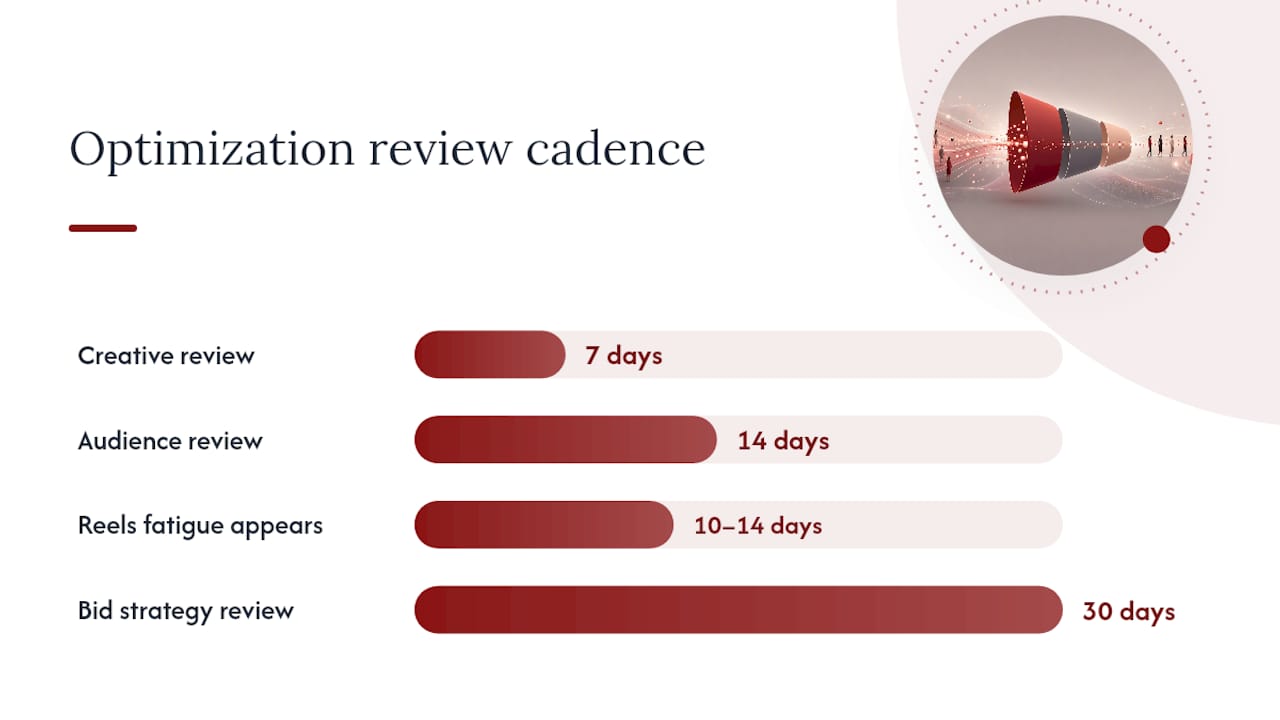
Run your optimization cadence on a schedule, not a whim. Review creative performance weekly, since Reels fatigue especially can show up within 10 to 14 days. Review audience performance every two weeks, giving Meta’s algorithm enough time to exit its learning phase before you judge a segment. Review bid strategy monthly, unless a campaign is clearly underperforming its break-even ROAS for two consecutive weeks, at which point pause or restructure rather than waiting it out.
One nuance worth remembering: a partner resource from Jarrod Harman on social measurement makes the point that testing discipline matters more than testing frequency. Changing too many variables at once, new creative and new audience and new bid strategy in the same week, makes it impossible to know which change actually moved the number.
Setting Up Your First Campaign: A Step-by-Step Checklist
Get the infrastructure right before you spend a single dollar on ads. Skipping this step is the number one reason campaigns look like they’re “not working” when really they’re just not measuring correctly.
- Confirm your Meta Business Manager is verified and connected to your Instagram business account.
- Set up Commerce Manager and upload your product catalog, checking that every SKU has a clean title, category, and current inventory status.
- Install the Meta pixel on your website and configure Conversions API as a backup signal, since browser-based tracking alone now misses a meaningful share of conversions due to privacy restrictions.
- Verify your domain in Business Manager, required for accurate event prioritization under Meta’s aggregated event measurement.
- Build your three campaign tiers: retargeting, mid-funnel, and prospecting, each with its own audience and creative set.
- Launch a starter creative matrix of at least 3 to 4 variants per tier, mixing Reels, Stories, and feed placements.
- Set your attribution window to 7-day click and 1-day view before launch, not after you notice numbers look low.
- Set a modest daily budget, monitor daily for the first week, then review weekly performance against your break-even ROAS.
By week three, you should have enough data to know which tier is carrying the account and which creative variant deserves more budget.
Dot Xero’s Practitioner Perspective: Common Mistakes and Prioritization
The mistake shows up in almost every audit: a store spending real money on Instagram ads while its pixel is misfiring, or worse, not firing at all on the actual purchase event. Dot Xero sees this constantly. Close behind it is single-asset creative running unchanged for months, and a product catalog with blurry images or missing categories that quietly tank Shopping ad eligibility.
Fix things in this order: tracking first, catalog second, creative velocity third, optimization cadence last. Chasing a better bid strategy while your pixel is broken is like polishing a car with a flat tire. Once tracking and catalog hygiene are solid, creative refresh becomes the highest-leverage lever, because it’s the one thing you can control weekly without waiting on Meta’s algorithm to catch up.
The accounts that outperform pure ad spend almost always pair Instagram retargeting with an email nurture sequence, catching cart abandoners who saw the ad but didn’t convert on the first tap. Instagram opens the door. What happens after the click, on your site and in your inbox flows, decides whether that visitor becomes a customer.
— Will
How Dot Xero Handles Instagram Ads for Ecommerce Stores
Dot Xero is the alternative to guessing your way through Meta Ads Manager alone. Instead of generic templates, you get a tracking and catalog audit first, then a pilot campaign built around your actual product margins, followed by scaled spend only on what’s already proven profitable in your account.
That audit-pilot-scale sequence matters because most stores lose money in the setup phase, not the strategy phase. A pixel that’s not firing correctly or a catalog with missing categories will sink even a well-targeted campaign before it gets a fair shot. Dot Xero’s social media advertising management covers exactly this: catalog integration, Conversions API setup, creative production, and the analytics reporting to show you which tier of your funnel is actually earning its budget. If your landing pages aren’t converting the traffic you’re already sending, Dot Xero’s website development team can fix that side of the equation too, since a great ad pointed at a slow or confusing product page wastes every dollar spent getting the click.
If you’re ready to see where your current setup is leaking money, consider arranging an audit and pilot campaign proposal built around your actual catalog and margins.
Sources
- Americans’ social media use in 2025 | Pew Research Center
- Instagram Ads: A Guide for Shopify Merchants (2026) | Shopify
- Instagram Shopping Ads: The Complete 2026 Playbook | Lightdrop
- 24 Successful Instagram Ads: Examples by Format (2026) | ManyPixels
FAQ
Is $5 a Day Enough for Instagram Ads?
A $5 daily budget can work for narrow retargeting audiences with a small pool of cart abandoners, but it’s rarely enough to exit Meta’s learning phase for cold prospecting, which typically needs 30 to 50 conversions per week to optimize well.
Is Instagram Good for Ecommerce?
Yes, particularly for visually driven, lower-consideration products, since Instagram’s discovery-heavy audience and Shopping-tagged ads let shoppers move from seeing a product to buying it without leaving the app.
Do Instagram Ads Work for Small Businesses?
They work well for small businesses that install proper tracking and start with retargeting before scaling into cold prospecting, since a small budget stretches further against a warm audience than a cold one.
Are Instagram Ads Good for Dropshipping?
Instagram ads can work for dropshipping, but the model’s typically thinner margins make catalog accuracy, fast shipping expectations, and honest product creative even more important, since a single bad review cycle can wipe out the ROAS gains from a strong campaign.