
SMBs: Recover a Suspended Google Business Profile; Fix Account Restrictions First
You can usually get a suspended Google Business Profile reinstated by resolving any Google Account restrictions first, then submitting an appeal with matching official documents. If your profile has vanished from Google Maps or shows a suspension notice, sign into the managing Google Account, open the appeals tool, and act fast: once you open the evidence form, you get 60 minutes to upload files before the window closes.
TL;DR:
- Ensure your Google Account has no restrictions before submitting an appeal, as account-level issues must be resolved first to succeed.
- Provide matching official documents such as business registration, license, tax certificate, and utility bills within a 60-minute upload window for a strong appeal.
- Verify your business name matches legal documents, your address is verifiable, and you have exclusive access rights to avoid common suspension triggers.
- Avoid creating new profiles during an appeal and do not submit duplicate appeals, since both actions can harm your chances of reinstatement.
- Reinstatement usually takes up to five business days after a complete, evidence-backed appeal, with content often restoring within 72 hours.
Table of Contents
- What to Check Before You Appeal a Google Business Profile Suspension
- Documents and Evidence to Prepare for Your Reinstatement Appeal
- How to Submit a Google Business Profile Appeal Step by Step
- Why Account Restrictions Block Appeals (and What to Do About It)
- Common Causes of Google Business Profile Suspension and Quick Fixes
- What Happens After Reinstatement and How to Prevent It Again
- What Suspension Triage Looks Like in Practice
- The Reinstatement Process Rewards Preparation, Not Speed
- How Dot Xero Helps You Recover and Protect Your Profile
- Official Google Resources and Practitioner Guides Worth Bookmarking
- Sources
- FAQ
What to Check Before You Appeal a Google Business Profile Suspension
Before you touch the appeals tool, figure out exactly what kind of trouble you’re in. Submitting the wrong fix for the wrong problem wastes your one good shot at a fast reinstatement.
Start by searching your business name on Google Maps from a different device or account. If the listing has disappeared entirely, you’re dealing with a hard suspension. If it still shows up but you can’t log in, edit, or respond to reviews, that’s a soft suspension, and BrightLocal’s breakdown of suspension types is worth reading to understand which camp you’re in.
Next, check the Google Account itself. Sign in and look for any account-level warning banners. An account in poor standing will sink even a technically perfect profile appeal.
Run through this before submitting anything:
- Business name matches your signage, licenses, and legal paperwork exactly, with no added keywords
- Address is a real physical location, not a P.O. Box or virtual office
- Hours, category, and phone number are current and accurate
- You’re the only one, or only trusted staff, with edit access to the profile
Documents and Evidence to Prepare for Your Reinstatement Appeal
Google’s own guidance names four categories of proof that carry the most weight in a reinstatement appeal: business registration paperwork, a business license, a tax certificate, and utility bills. The strongest appeals lead with these, in roughly this order of priority:
- Official business registration — articles of incorporation, a DBA filing, or state registration showing your legal business name.
- Business license — your current operating license, ideally one that shows the exact address on your profile.
- Tax certificate — a sales tax permit or business tax certificate tied to the same name and address.
- Utility bills — a recent electricity, phone, water, or internet bill that matches the business name and address on your profile character for character.
The naming and address details are non-negotiable. If your license reads “Johnson Plumbing LLC” and your profile says “Johnson Plumbing & Sons,” that mismatch alone can undermine what could otherwise be a strong appeal.
Pro Tip: Scan documents as clean PDFs or JPGs, name each file logically (something like “BusinessLicense_JohnsonPlumbing_2026.pdf”), and redact only the personal data that isn’t needed for verification. Never redact the business name or address.
Once you open the evidence form, the clock starts. You have 60 minutes to get everything uploaded, so gather every document before you click that button, not after.
How to Submit a Google Business Profile Appeal Step by Step
The appeals tool itself is straightforward once your documents are ready. Sign in with the Google Account that manages the suspended profile, since a personal account with no ties to the business won’t work.
Here’s the flow:
- Locate the affected profile in your account and select the option to appeal the suspension
- Choose the specific decision you’re appealing (some profiles get multiple notices for different issues)
- Complete the evidence form with your business details and attach your prepared documents
- Submit within the 60-minute window and confirm you received a case or reference number
Pro Tip: Don’t create a new listing while your appeal is pending. Google’s systems often flag duplicate profiles as spam, which can tank your chances on both the old listing and the new one.
Avoid filing a second appeal for the same suspension while the first is still in review. Stacking appeals confuses the review queue and rarely speeds anything up.
Why Account Restrictions Block Appeals (and What to Do About It)
A profile appeal cannot succeed if the Google Account managing it is restricted. Google has confirmed that account-level restrictions must be resolved before any profile-specific appeal has a real chance of approval. This is the single most overlooked step in the whole reinstatement process.
Check your account status through your Google Account settings page. If you see a restriction notice, appeal that first through the dedicated account appeals process, separate from the profile appeals tool.
If your initial profile appeal comes back denied:
- Request additional review directly through the appeals tool
- Attach any new evidence you didn’t include the first time, especially documents that address the specific denial reason
- Expect account-level appeals to take up to five business days to process
Google does offer this additional review as a real second chance, not just a formality, so use it deliberately rather than resubmitting the same weak evidence twice.
Common Causes of Google Business Profile Suspension and Quick Fixes
Most suspensions trace back to a handful of repeat offenders, and Google’s own policy pages list them plainly.
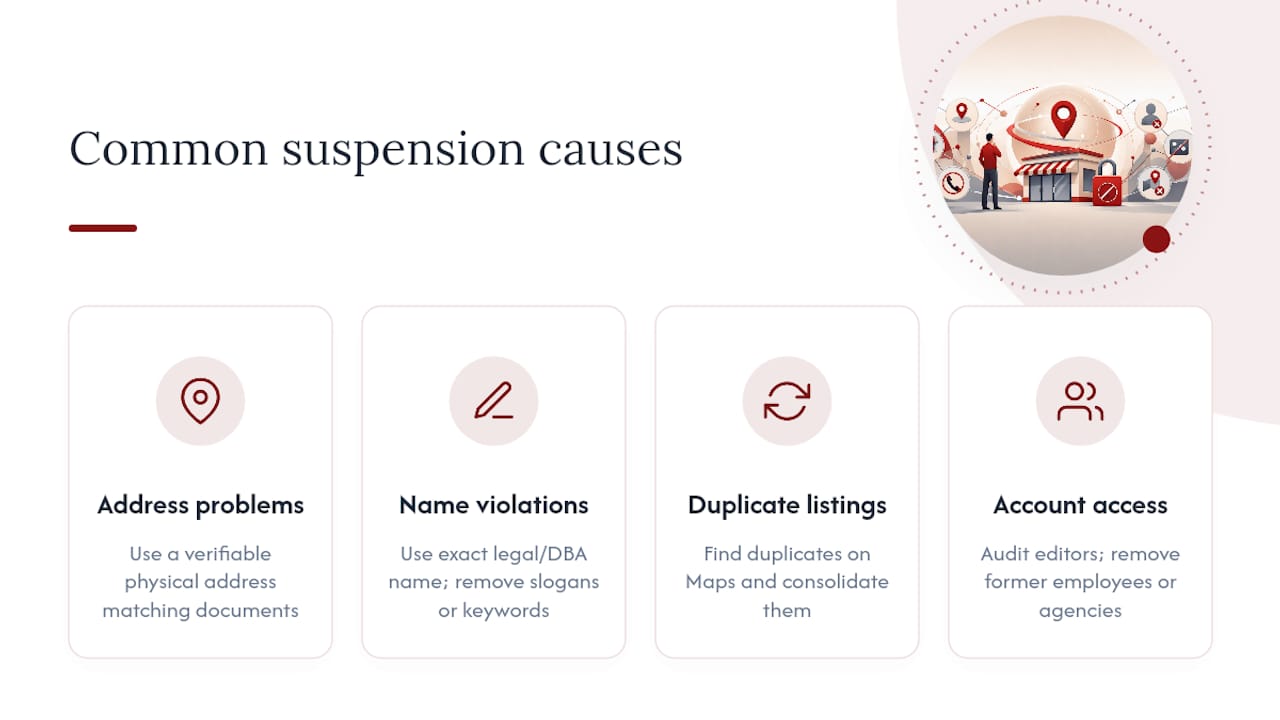
Address problems top the list. A P.O. Box, a virtual office, or an address that doesn’t match your utility bills or license is one of the fastest ways to trigger a review. Fix this by updating your profile to a verifiable physical address and confirming it matches every supporting document. If you recently moved, Corvane Systems’ guide to changing your Google Business Profile address walks through the verification pitfalls that catch a lot of owners off guard.
Business name violations come next. Adding phrases like “Best Plumber in Town” or a service keyword to your official name violates Google’s name and content policies. Revert to your exact legal or DBA name.
Duplicate listings cause conflicts when two profiles exist for the same location. Identify duplicates through a Maps search and consolidate them.
Finally, review your account access history. If a former employee or agency still has edit rights, audit and remove anyone who shouldn’t be there.
What Happens After Reinstatement and How to Prevent It Again
Reinstatement isn’t instant satisfaction, but it’s close. Practitioners tracking recovery patterns note that content and reviews often restore within about 72 hours once Google approves the appeal, though exact timing varies by case.
Once you’re back, run through this short checklist:
- Re-verify every field on your profile: name, address, phone, hours, and category
- Check who has manager or owner access and remove anyone unnecessary
- Save copies of every document you submitted, in case you need them again
- Set a calendar reminder to review your profile quarterly for accuracy
Pro Tip: Keep a folder of your verification documents ready year-round. If you ever face a second suspension, you’ll cut your response time from days to minutes.
Going forward, keep your name, address, and phone number identical across every directory listing, resist the urge to stuff keywords into your business name, and document your verification evidence the moment you complete it, not months later when you actually need it.
What Suspension Triage Looks Like in Practice
Agencies handling this daily follow a pattern that mirrors what usually gets results: snapshot the current profile and Maps listing, pull every verification document and account sign-in log, then check the user access history for edits that don’t belong. Suspicious changes, a mismatched address entered by a former contractor, a name edit nobody approved, show up more often than owners expect.
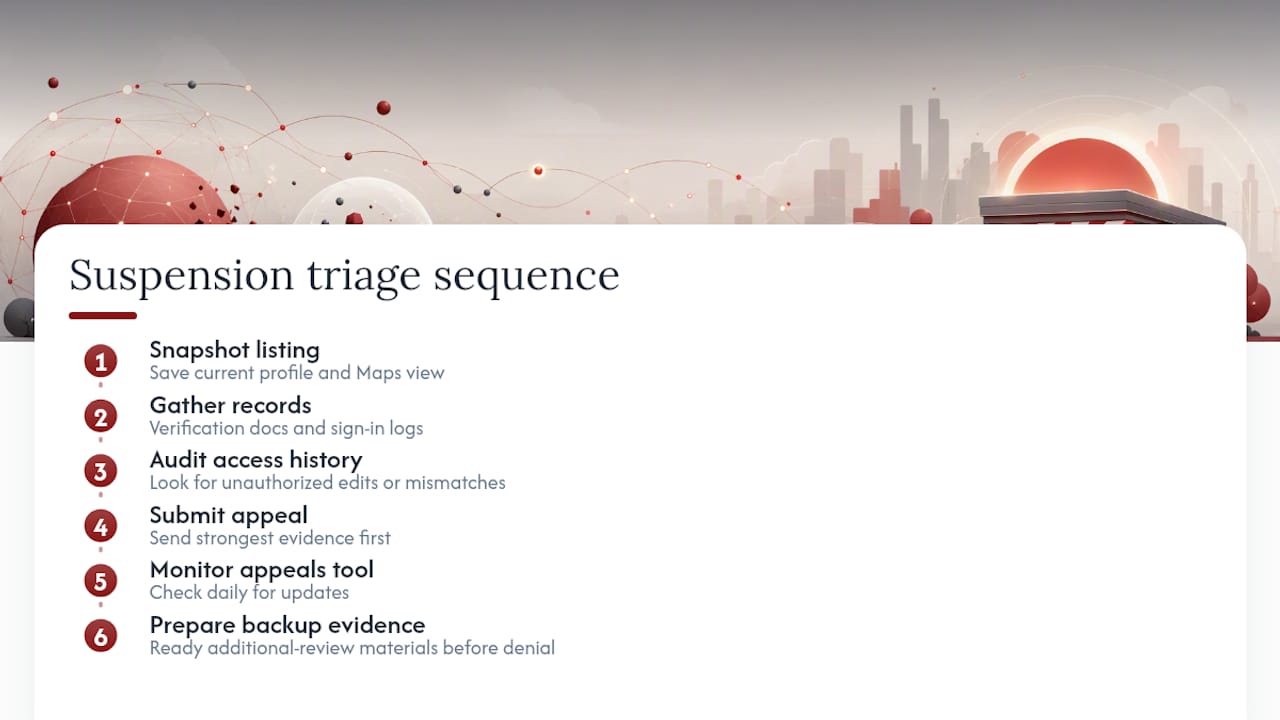
From there, the appeal goes in with the strongest evidence first, not everything at once. Then comes the part most owners skip: watching the appeals tool daily and having additional-review evidence ready before a denial ever arrives. Reinstatement timelines shift case by case, but preparation rarely goes to waste.
The Reinstatement Process Rewards Preparation, Not Speed
Most advice on this topic treats the appeals tool like a form to fill out fast. That’s backwards. The businesses that get reinstated quickly are the ones that slowed down long enough to check account status first, since a restricted account will quietly doom an otherwise perfect appeal every time.
The conventional wisdom also underplays how much address and name consistency matters. Owners fixate on writing a compelling appeal message when Google’s review process is really just document matching. Your utility bill either matches your profile or it doesn’t.
If there’s one thing to prioritize above everything else in this guide, it’s the account restriction check. Skip straight to the evidence checklist and you might build a strong appeal on a foundation that was never going to hold. Fix the account, then fix the profile. Everything else, the document formatting, the timing, the follow-up, matters far less than getting that order right.
— Will
How Dot Xero Helps You Recover and Protect Your Profile
A suspended profile costs you calls, reviews, and map visibility every day it stays down, and most owners don’t have time to learn Google’s appeals system while also running their business. Dot Xero handles the parts that eat your afternoon: a profile audit to pinpoint the exact cause of your suspension, appeal preparation using the documents Google actually recognizes, and ongoing local SEO and profile management so a fixed listing doesn’t slide backward six months later.

While your listing is down, visibility doesn’t have to stop. Dot Xero can also stand up short-term Google Ads or Facebook and Instagram campaigns to keep leads coming in during the appeal window. If your whole online presence needs a second look, a custom website rebuild often catches the same address and naming inconsistencies that got your profile flagged in the first place. Reach out through Dotxero to request a profile audit and get a straight answer on what’s actually causing your suspension.
Official Google Resources and Practitioner Guides Worth Bookmarking
Bookmark these before you need them again:
- Fix suspended or disabled profiles, Google’s core help page and appeals tool entry point
- Appeal Business Profile content and profile restrictions for account-level appeal steps
- Overview of Google Business Profile policies for the full rulebook on what triggers suspensions
- Google’s step-by-step video walkthrough on the community forum for a visual walkthrough of the process
Sources
- Fix suspended or disabled profiles – Google Business Profile Help
- Overview of Google Business Profile policies – Google Business Profile Help
- Appeal Business Profile content and profile restrictions – Google Business Profile Help
- Google Business Profile Suspensions — Causes and fixes – BrightLocal
FAQ
How Long Does a Google Business Profile Suspension Last?
There’s no fixed duration. It depends entirely on how quickly you submit a complete appeal with matching evidence, and account-level appeals can take up to five business days once filed.
Can I Create a New Google Business Profile While Suspended?
No. Creating a new listing while your original appeal is pending often gets flagged as duplicate content and can hurt your chances of recovering the original profile.
What’s the Difference Between a Hard and Soft Suspension?
A hard suspension removes your listing from Google Maps entirely, while a soft suspension keeps it visible but restricts your ability to manage or edit it.
Will My Reviews and Photos Come Back After Reinstatement?
Content typically restores within a few days after Google approves your appeal, though the exact timing varies by case.
What If My Appeal Gets Denied?
Request additional review through the appeals tool and submit any new evidence that directly addresses the reason for denial, since resubmitting the same documents rarely changes the outcome.