
Fix Deliverability in Days for Marketers: Authenticate, Verify, Warm
To improve inbox placement fast, authenticate your sending domain, verify every recipient before you send, warm up new IPs and domains, and monitor reputation, in that order. Skip a step and mailbox providers stop trusting the rest. Some fixes land within a day; reputation recovery takes weeks.
TL;DR:
- Authenticating your domain with SPF, DKIM, and DMARC must be done correctly and in the proper order to ensure trust from mailbox providers.
- Verifying and re-verifying your email list every 90 days significantly reduces bounce rates and protects your sender reputation.
- Warming up a new IP or domain gradually over weeks, focusing on engaged subscribers, prevents triggering filters and builds a strong reputation.
- Content should include plain-text alternatives, avoid large images without text, and use your own domain links to reduce spam filter triggers.
- Monitoring key metrics such as bounce, complaint, and inbox placement rates daily helps identify issues early and maintain healthy deliverability.
Table of Contents
- Email Deliverability Best Practices: The Five Pillars
- How Do You Set Up SPF, DKIM, and DMARC Correctly?
- What Bounce Rate and List Hygiene Rules Actually Matter?
- How Do You Warm Up a New IP or Domain?
- What Content and Formatting Habits Reduce Spam Filtering?
- Which Metrics Should You Monitor and How Often?
- What Should Your Pre-Send Checklist Cover?
- What Deliverability Problems Does Dot Xero Fix Most Often?
- Why Deliverability Work Rewards Patience Over Panic
- Get Help Implementing Your Email Deliverability Checklist
- Sources
- FAQ
Email Deliverability Best Practices: The Five Pillars
Deliverability comes down to five things mailbox providers grade, in a specific order: authentication, list hygiene, warmup and volume, content and formatting, and monitoring. Getting the order right matters as much as getting each pillar right, because providers like Gmail and Outlook check trust signals sequentially. A perfectly written email from an unauthenticated domain gets filtered before anyone reads a word of it.
Authentication comes first because it’s the entry ticket. SPF, DKIM, and DMARC tell a receiving server that you are who you claim to be. Without alignment on all three, nothing else you do matters much, since authentication and warmup act as pass/fail gates, and providers treat unauthenticated mail as suspicious regardless of how good the content is.
List hygiene comes next because a clean sender with a dirty list still looks like a spammer. Warmup and volume control follow, since even a trusted, clean sender can trigger filters by sending too much too fast. Content and formatting round out the technical work, and monitoring ties it all together by telling you when something breaks.
Some of this you can fix today. Others take real time:
- Immediate fixes: correcting a broken SPF record, adding a missing DKIM selector, removing obvious role-based addresses (info@, admin@) from your list.
- Days to weeks: warming a new IP or domain, running suppression and re-engagement campaigns, rebuilding DMARC alignment from p=none to p=reject.
- Ongoing: monitoring complaint rates, tracking inbox placement, adjusting send cadence based on engagement data.
Treat the quick wins as your starting checklist. Treat warmup and reputation recovery as a project with a real timeline, not a switch you flip.
How Do You Set Up SPF, DKIM, and DMARC Correctly?
SPF (Sender Policy Framework) lists which servers are allowed to send mail for your domain. DKIM (DomainKeys Identified Mail) signs your messages cryptographically so receivers can verify they weren’t altered in transit. DMARC (Domain-based Message Authentication, Reporting and Conformance) ties the two together and tells receivers what to do when a message fails, plus it sends you reports on who’s sending mail using your domain name.
Alignment is where most setups fail quietly. SPF and DKIM can both pass technically while DMARC still fails, because DMARC checks whether the domain in the “From” header matches the domain that authenticated. A marketing platform sending on your behalf from a slightly different domain can break this without throwing an obvious error.
Here’s the setup sequence that avoids the most common mistakes:
- Audit existing DNS records first. Multiple SPF records for one domain is a frequent error, and it invalidates SPF entirely. You get one SPF record per domain, combining all authorized senders into it.
- Watch the SPF lookup limit. SPF allows a maximum of 10 DNS lookups; too many included third-party services (your ESP, CRM, help desk) and the check fails silently.
- Publish DKIM with a strong key. Use at least a 1024-bit key, rotate selectors periodically, and confirm your ESP is signing with the domain you actually send from.
- Start DMARC at p=none. M3AAWG’s sender best practices recommend beginning in monitoring mode so you can review aggregate reports before enforcing anything, then moving to p=quarantine and eventually p=reject once you’re confident nothing legitimate is failing.
If a third party sends on your behalf, use a subdomain (mail.yourdomain.com) rather than your root domain, and confirm they support delegated DKIM signing. Review DMARC aggregate reports monthly at minimum; they’ll show you exactly which sending sources are passing and which aren’t, including services you forgot you’d connected.
If you’re pursuing BIMI (Brand Indicators for Message Identification) to display your logo in supported inboxes, you need DMARC enforced at quarantine or reject, a verified SVG logo file, and in some cases a Verified Mark Certificate.
Pro Tip: Run your domain through a free SPF/DKIM/DMARC checker before every major campaign, not just once at setup. DNS records get overwritten by new tools and forgotten integrations more often than people expect.
What Bounce Rate and List Hygiene Rules Actually Matter?
Hard bounces are the fastest way to tank a sender reputation, and the threshold isn’t fuzzy: keep your hard bounce rate under 2%. Cross that line and providers start treating you as a sender who doesn’t clean their list, which triggers filtering that outlasts the specific campaign that caused it.
Threshold to remember: Hard bounce rate should stay under 2%. Complaint rate should stay under 0.1%, with 0.3% as the point where major providers start throttling you outright.
Pre-send verification is the fix, and it needs to happen before every send, not just once when a list is built. Double opt-in reduces junk signups at the source, but even double opt-in lists decay. An address that was live in January can bounce by June simply because someone abandoned it or their employer changed domains, since verification is an ongoing process, not a one-time event.
Practical list hygiene rules that hold up over time:
- Run every new list through a verification pass before its first send, and re-verify lists older than 90 days.
- Stack verification with engagement filtering: an address that’s “valid” but hasn’t opened anything in a year behaves like a risk regardless of technical validity.
- Sunset inactive subscribers through a structured re-engagement series (typically two to three attempts) before suppressing them permanently.
- Deduplicate across import sources; the same person entering your list twice under slightly different addresses inflates both your count and your risk.
- Log consent details for every signup, including timestamp, IP address, and the exact form URL, so you have a record if a complaint or compliance question comes up later.
- Never buy or rent a list. Purchased lists carry spam traps by design, and a single trap hit can damage a domain’s reputation for months.
Non-delivery reports (NDRs) deserve real attention too. Under the SMTP standards M3AAWG references, a 4xx response is temporary (a full inbox, a momentary server issue) while a 5xx response is permanent (the address doesn’t exist). Your sending platform needs to distinguish between the two and suppress 5xx addresses automatically, because retrying a hard bounce repeatedly is one of the fastest ways to trip spam filters.
How Do You Warm Up a New IP or Domain?
A new sending domain or IP has no history, and mailbox providers treat unknown senders with suspicion by default. Warmup builds that history gradually, starting small and increasing volume in a way that looks like organic growth rather than a sudden blast.
- Start with your most engaged segment. Send to subscribers who’ve opened or clicked recently, in small batches, so early engagement signals are strong.
- Double volume roughly every two to three days, based on common warmup schedules, stretching the full ramp over several weeks depending on your target volume.
- Watch deferral rates and complaint spikes daily during warmup. A jump in either is your signal to pause and hold volume steady rather than pushing forward on schedule.
- Decide dedicated versus shared IP based on volume, since reputable shared pools often outperform a cold dedicated IP below roughly 100,000 messages a month; above that threshold, a dedicated IP usually makes sense because you control your own reputation rather than sharing it with other senders on the same pool.
- Handle seasonal spikes by pre-warming, not by blasting. If you know volume will triple for a holiday push, increase gradually in the weeks before rather than jumping straight to peak volume on day one.
A dedicated IP only helps if you can sustain consistent volume; sporadic sending on a dedicated IP builds a weaker, patchier reputation than steady sending on a well managed shared pool.
What Content and Formatting Habits Reduce Spam Filtering?
Subject lines matter less for spam scoring than they used to, but preview text mismatches still hurt engagement, and engagement feeds directly into reputation. Write subject lines and preview text that describe the same thing; a mismatch reads as manipulative to both readers and filters.
Structural signals carry more weight than most marketers assume:
- Always include a plain-text alternative alongside your HTML using multipart/alternative formatting; some filters specifically flag HTML-only email.
- Keep a reasonable text-to-image ratio; an email that’s a single large image with almost no text is a classic spam pattern.
- Use your own branded domain for links rather than a URL shortener, since shorteners are a known trigger for spam filters that can’t verify where a shortened link actually leads.
- Add alt text to every image and keep file sizes reasonable; slow-loading images hurt engagement even when they don’t trigger filters directly.
- Include a visible, one-click unsubscribe link and the List-Unsubscribe header, which is now effectively required by Gmail and Yahoo’s bulk sender rules.
Pro Tip: If your emails are heavy on imagery for design reasons, add a short text summary above the image block. It gives filters real text to parse and gives readers a reason to keep scrolling on slow connections.
Which Metrics Should You Monitor and How Often?
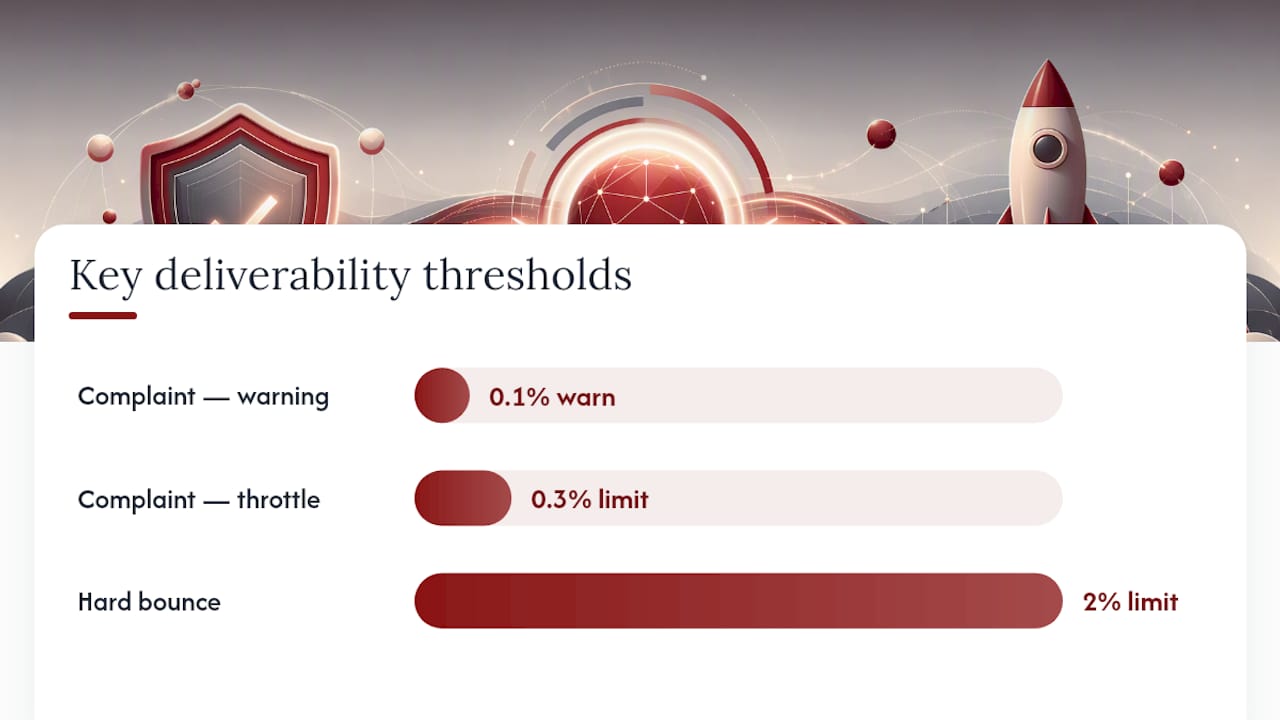
Five metrics tell you almost everything about your sending health: hard bounce rate, complaint rate, inbox placement rate, deferral rate, and engagement (opens and clicks). Hard bounces should stay under 2%, complaints under 0.1% as a warning line and under 0.3% before major providers start throttling you, based on WordStream’s threshold guidance.
Four tools cover most of what you need:
- Google Postmaster Tools shows domain reputation, spam rate, and IP reputation specifically for Gmail, which is often the single most instructive data source you have.
- Microsoft SNDS (Smart Network Data Services) gives the equivalent view for Outlook and Hotmail sending.
- MXToolbox or MultiRBL checks whether your IP or domain has landed on a blacklist.
- DMARC aggregate reports show every source sending mail as your domain, which catches both misconfigurations and outright spoofing attempts.
Check bounce and complaint rates daily right after a send; check overall reputation and blacklist status weekly. If a metric spikes, pause to send if it’s still running, isolate whether the issue is IP based or content based, and run a seed test before resuming.
What Should Your Pre-Send Checklist Cover?
Run this audit before every major campaign, not just the first one. A compact pre-send audit covering authentication, list health, warmup status, and content catches most failures before they cost you reputation.
- Confirm SPF, DKIM, and DMARC are passing and aligned for the exact sending domain you’re using.
- Pull a verified recipient subset; if your full list hasn’t been checked in 90 days, verify it now.
- Run a seed test to a set of accounts across Gmail, Outlook, and Yahoo before the full send.
- Check your sending IP and domain against MXToolbox or a similar blacklist checker.
- Confirm the List-Unsubscribe header and a visible unsubscribe link are both present.
- Spot-check that consent records exist for a sample of the list you’re about to email.
A seed test tells you where mail actually lands: inbox, spam folder, or not delivered at all (deferred or bounced). If more than one seed account shows spam placement, that’s your no-go signal. Fix the flagged issue and retest rather than sending to your full list and hoping.
| Checklist Item | Go Signal | No-Go Signal |
|---|---|---|
| Authentication | SPF, DKIM, DMARC all pass and align | Any of the three fails or misaligns |
| Seed test results | Majority land in inbox | Any spam folder placement |
| Blacklist check | Clean across major RBLs | Listed on any active blacklist |
| List verification | Verified within last 90 days | Unverified or older than 90 days |
| Unsubscribe compliance | Visible link plus List-Unsubscribe header | Either one missing |
What Deliverability Problems Does Dot Xero Fix Most Often?
Most deliverability issues seen aren’t exotic. It’s the basics, misconfigured quietly enough that a business doesn’t notice until open rates have been sliding for weeks.
- A client’s SPF record with two competing entries, added by two different marketing tools over the years, silently failing authentication for both.
- DKIM signing set up correctly at launch, then broken months later when a business switched email platforms and never updated the DNS record.
- Lists built through years of trade shows and business cards, never verified, with hard bounce rates well above the 2% danger line.
- Campaigns sent from a brand new domain at full volume on day one, with no warmup period at all.
Fixing DNS misconfigurations and running a warmup schedule is usually a self-service job if you have the technical comfort for it. Businesses sometimes bring in help when the list hygiene work and ongoing monitoring compete with running the actual business.
Why Deliverability Work Rewards Patience Over Panic
Authentication fixes resolve in hours. Warmup takes weeks. A damaged sender reputation can take a full quarter to fully recover, even after you’ve corrected everything. Measure weekly, adjust based on what the data shows, and resist the urge to declare victory after one good send.
— Will
Get Help Implementing Your Email Deliverability Checklist
Reading a checklist and executing it under deadline pressure are two different things, especially when you’re also writing campaigns, managing a list, and running the rest of a business. Dotxero handles email deliverability as one piece of a broader email marketing service built around custom strategy rather than a one-size-fits-all template, with authentication setup, list verification, warmup scheduling, and campaign monitoring handled as part of the ongoing work rather than a one-time favor.

If your open rates have been sliding and you’re not sure whether the problem is your list, your authentication, or your content, that diagnosis is the first thing worth getting right before you spend another month guessing. Reach out through the email marketing page to talk through where your sending currently stands and what a realistic fix timeline looks like for your list size and volume.
Sources
For technical depth beyond this checklist, these sources cover the standards and thresholds referenced throughout:
- M3AAWG Sender Best Common Practices Aug-27-2026
- The Complete Guide to Email Deliverability (2026) | Clay
- Email Deliverability Checklist 2026: 47-Point Pre-Send Audit | SendHaven
- The Complete Email Deliverability Checklist for 2026 (+Tools & Tips) | WordStream
FAQ
How Do You Get Better Email Deliverability?
Sequence the work: authenticate your domain with SPF, DKIM, and DMARC, verify your list before sending, warm up any new domain or IP gradually, and monitor complaint and bounce rates weekly. Skipping the sequence, especially sending unauthenticated or unverified, undoes the benefit of good content.
What Hurts Email Deliverability the Most?
Failed or misaligned authentication is the biggest single factor, since it can get mail filtered before content even matters. Beyond that, hard bounce rates above 2% and complaint rates above 0.1% are the two metrics that do the most damage to sender reputation over time.
What’s the Difference Between Email Delivery and Email Deliverability?
Email delivery means the message reached the receiving server without bouncing; it’s a binary technical outcome. Email deliverability means the message actually landed in the inbox rather than spam, which depends on authentication, sender reputation, and content quality rather than just successful transmission.
How Often Should You Re-Verify Your Email List?
Re-verify any list you’re actively sending to at least every 90 days, since addresses that were valid months ago can go dead without any obvious signal. Lists that see frequent signups from web forms often need more frequent checks because of how quickly typos and abandoned addresses accumulate.
Should You Use a Dedicated or Shared IP Address?
Below roughly 100,000 messages a month, a reputable shared IP pool typically outperforms a newly warmed dedicated IP, according to SendHaven’s volume guidance. Above that volume, a dedicated IP usually makes sense, but only if you can sustain consistent sending, since sporadic volume on a dedicated IP builds a weaker reputation than steady volume on a shared pool.