
Recover Revenue: 3 Email Abandoned Cart Emails for Ecommerce Stores
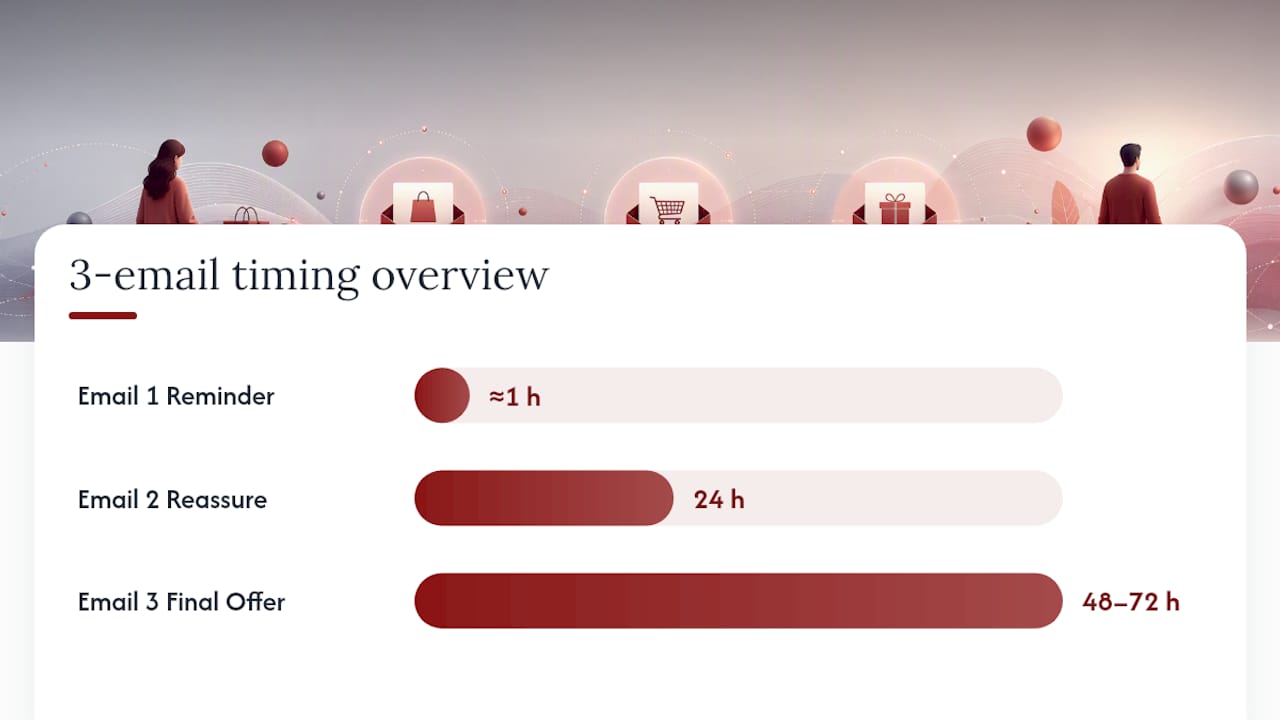
A 2 to 3 email abandoned cart sequence, first message within an hour or two, then follow-ups around the 24 hour and 48 to 72 hour marks, recovers lost sales more reliably than any other flow shape. Lead with clear product context and one obvious call to action. Save discounts for the second or third message, not the first, or you’ll train shoppers to wait for a coupon every time.
TL;DR:
- Sending a three-part abandoned cart email sequence within the first 72 hours recovers sales more effectively than longer or more complex flows.
- Triggering emails based on customers entering checkout offers higher recovery rates than using earlier signals like cart addition, especially if email capture is reliable.
- Including specific product details, a clear checkout button, and a plain-text fallback in emails boosts recognition and click rates, with mobile-first design being essential.
- Timing emails within one to four hours after abandonment, and personalizing subject lines with the shopper’s name or product, significantly increases open and click rates.
- Reserving discounts for the last emails and prioritizing lower-cost incentives like free shipping or samples maintains margins while encouraging conversions.
Table of Contents
- What Are Abandoned Cart Emails, and What Do They Actually Do?
- Recommended Abandoned Cart Email Sequence: A Practical Starter Flow
- What Core Components Belong in Every Abandoned Cart Email?
- How Do Timing and Triggers Affect Recovery Rates?
- What Personalization and Segmentation Actually Move the Needle?
- When Should You Use Discounts vs. Other Incentives?
- Which Subject Lines and Copy Patterns Increase Opens and Clicks?
- How Should SMS and Retargeting Fit Into a Cart Recovery Strategy?
- What Metrics and Benchmarks Should You Track?
- Cart Recovery Email Examples and Templates You Can Adapt
- An effective abandoned cart program benefits from an agency checklist that includes verifying integrations, trigger accuracy, product rendering, testing, and analytics setup to identify common break points in cart flows.
- The Real Problem With Most Abandoned Cart Advice
- Get Your Abandoned Cart Flow Built Right the First Time
- Sources
- FAQ
What Are Abandoned Cart Emails, and What Do They Actually Do?
An abandoned cart email is a triggered message sent when someone adds items to an online shopping cart, starts the checkout process, then leaves without buying. The email reminds them what they left behind and gives them a fast path back to checkout.
The opportunity here is bigger than most merchants realize. The average cart abandonment rate across ecommerce sits at roughly 70.22 percent, and mobile abandonment runs even higher. That means for every 10 people who put something in a cart, seven walk away before paying. Some of them get distracted. Some hit an unexpected shipping cost. Some just aren’t ready yet. An abandoned cart flow is the mechanism that brings a meaningful slice of that group back.
This differs from a generic newsletter or a welcome email flow in one key way: it’s triggered by behavior, not by a schedule. While an onboarding email series introduces a new subscriber to your brand over days or weeks, an abandoned cart flow reacts to a single, specific action, someone leaving mid-purchase, and responds within hours. That specificity is exactly why it converts so much better than broadcast email ever will.
Recommended Abandoned Cart Email Sequence: A Practical Starter Flow
Before writing a single subject line, decide what event actually starts your flow. Two triggers are available in almost every email platform, and picking the wrong one wastes your best shot at recovery.
Started checkout fires when a shopper enters payment or shipping details but doesn’t complete the order. This is the higher-intent signal, and it almost always comes with a captured email address, since most checkout flows ask for one early. Added to cart fires earlier, sometimes before a shopper has entered any contact information at all, which means you can only email people you already know. Most stores get better results defaulting to “started checkout” as the primary trigger, then layering “added to cart” on top only if their platform can reliably capture email at that earlier stage.
Once the trigger is set, here’s a starter sequence commonly recommended for businesses building their first flow:
- Email 1, sent around 1 hour after abandonment. Keep it simple: a reminder of what’s in the cart, no discount, no urgency tactics. The goal is just to catch someone before the moment passes.
- Email 2, sent around 24 hours later. This is where you handle objections, reassure on shipping and returns, and add a short social proof line if you have one.
- Email 3, sent around 48 to 72 hours later. This is your last real shot. If a discount or a conditional incentive is going to appear, it belongs here, not earlier.
This 3 email structure lines up with what recovery-focused agencies see working across thousands of abandoned cart flows and is a common default before customizing for a client’s catalog and margins.
A few guardrails matter as much as the timing itself. If you add SMS, treat it as one companion message with its own explicit opt-in, never a duplicate of the email sent at the same moment. Sending both channels simultaneously to the same abandoner just increases the odds of an unsubscribe, not a purchase. Just as important: build purchase suppression into every step. If a customer checks out between Email 1 and Email 2, that customer needs to exit the flow immediately. Nothing damages trust in a brand faster than a “we noticed you left something behind” email arriving after the order confirmation.
What Core Components Belong in Every Abandoned Cart Email?
Every abandoned cart email lives or dies on how fast it re-establishes what the shopper was about to buy. You have maybe two seconds before someone decides whether to open, skim, or delete, so the design and copy need to do the recognition work instantly.
The essentials that belong in every message:
- Product image, name, price, and variant. If someone abandoned a cart with a blue medium jacket at $89, show exactly that, not a generic “you left something in your cart” graphic.
- One clear call to action. A single button that returns the shopper directly to their checkout, pre-filled with the same cart contents. Multiple competing buttons split attention and hurt clicks.
- A plain-text fallback link. Some email clients strip images or block buttons from rendering. A visible text link under the button catches shoppers whose inbox doesn’t cooperate.
- Reassurance signals. A short line on free shipping thresholds, an easy returns policy, or secure checkout badges removes the friction that caused the abandonment in the first place.
- A brief social proof line, where relevant, such as a star rating or a one-sentence review snippet next to the product.
Design matters just as much as copy. Build every template mobile first: single column layout, a large tappable button, images that load fast on a spotty connection, and alt text on every image so the message still makes sense if images don’t render at all. Given that mobile abandonment tends to run higher than desktop, an email that looks great on a 27 inch monitor but breaks on a phone screen is solving the wrong problem.
Pro Tip: Test your abandoned cart email on an actual phone with images turned off before you launch it. If the message still makes sense using only the subject line, preview text, and alt text, your fallback is solid. If it reads as a blank box with a mystery button, fix the alt text before you fix anything else.
How Do Timing and Triggers Affect Recovery Rates?
Timing is the single lever with the biggest effect on whether an abandoned cart email gets opened at all. Wait too long and the shopper has already bought the item somewhere else, or simply forgotten why they wanted it.
Sending Email 1 within one to four hours preserves purchase intent while it’s still fresh. The shopper remembers the product, remembers why they wanted it, and hasn’t yet talked themselves out of buying. Most stores should test both ends of that window, a 1 hour send against a 4 hour send, because audience behavior varies more than most guides admit. A B2B buyer shopping on a lunch break behaves differently than a parent browsing at 11 p.m. after the kids are asleep.
From there, the rest of the sequence follows a predictable rhythm:
- Email 2 at roughly 24 hours gives the objection-handling and social proof message time to land the next day, often during a different part of the shopper’s routine.
- Email 3 at roughly 48 to 72 hours serves as the final push, and it’s the natural spot for a conditional incentive if you’re using one.
- Local send windows matter more than most merchants assume. Evening opens frequently outperform daytime sends for consumer retail, so configure your flow to respect the recipient’s timezone rather than the timezone your email platform defaults to.
- Event filters need to run at every step, not just at the start. Configure exits on purchase completion, and add checks that prevent the same shopper from receiving both an “added to cart” and a “started checkout” email for the same session.
That last point trips up more merchants than any other technical detail in a cart flow. Running both trigger types without deduplication logic means some shoppers get double-emailed in the same afternoon, which reads as spam even when every individual message is well written.
What Personalization and Segmentation Actually Move the Needle?
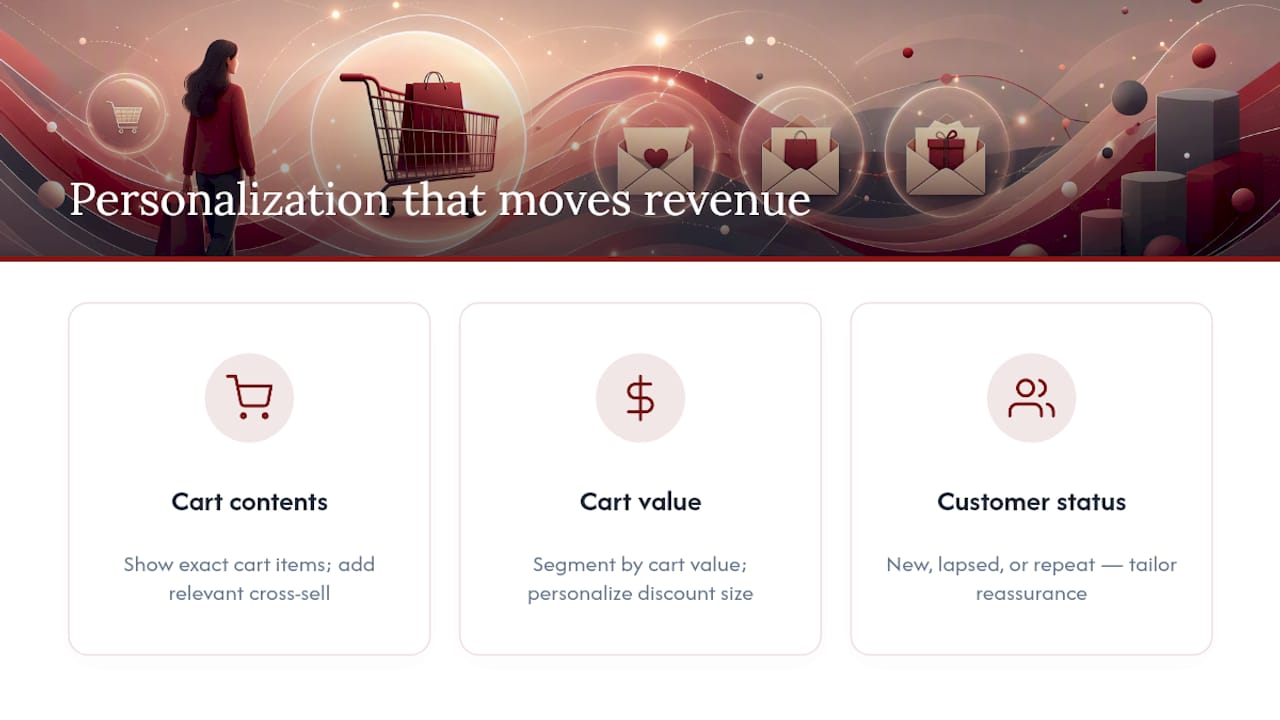
Not all personalization pays off. The moves that actually drive incremental revenue are narrower than most email platforms’ marketing copy suggests, and getting specific about which three matter saves you from wasting effort on the rest.
Segmenting by cart value and purchase history delivers the clearest return. A $40 cart and a $400 cart shouldn’t receive the same treatment; the second deserves either a more careful, less discount-heavy message or outreach that feels more personal, since the margin at stake justifies it. Split flows further by whether the shopper is new, a lapsed repeat customer, or someone with an existing purchase history, since each group responds to different reassurance.
Dynamic product blocks that show the exact cart contents, not a generic category image, are the second lever. If your platform supports it, add a recommended cross-sell next to the abandoned item, ideally one with better margin, but only when it’s genuinely relevant to what they were about to buy.
Subject lines that include a first name and the specific product tend to earn higher open rates than generic subject lines, and where you have predictive models available, personalizing the incentive size to an individual’s likelihood to convert without a discount protects margin on the customers who would have bought anyway. The signals worth acting on are narrow: cart contents, cart total, and customer status account for most of the uplift, more than deep, browsing-history style personalization ever does.
That last point is worth sitting with, because it cuts against a common assumption. There’s a real temptation to reference everything you know about a shopper, browsing history, unrelated past purchases, pages they lingered on, in the name of relevance. Resist it. Referencing data a shopper didn’t knowingly hand over in the checkout flow feels invasive rather than helpful, and it tends to suppress conversions rather than lift them.
When Should You Use Discounts vs. Other Incentives?
The instinct to open with a discount is understandable and almost always wrong. Holding the incentive back protects your margin and keeps discounts from becoming the expectation every returning shopper waits for.
Reserve any discount for Email 2 or Email 3, and even then, only extend it to segments where the predicted lift genuinely outweighs the margin you’re giving up. A first-time visitor with a $35 cart is a very different offer decision than a repeat customer who buys from you every month regardless of a coupon code.
Before reaching for a percentage-off code, consider the lower-cost alternatives:
- Free shipping thresholds often recover a sale just as effectively as a discount, without cutting into your margin the same way.
- A small bonus item or sample can close the gap for price-sensitive shoppers without setting a discount precedent.
- Conditional logic based on customer lifetime value lets you offer a discount to new or low-CLV shoppers while keeping high-value repeat customers on no-discount messaging, since they were likely to convert anyway.
- Expiration windows create urgency, but test them; a 24 hour window can feel too aggressive for some audiences and too easy to ignore for others.
The discipline of holding back the discount until later in the sequence is one of the clearest, most testable levers in this entire playbook. Run the test yourself: split a segment into “discount from Email 1” against “discount only in Email 3,” and track revenue per recipient, not just conversion rate, since the first group typically converts a bit more often at a real cost to average order value.
Which Subject Lines and Copy Patterns Increase Opens and Clicks?
Subject lines carry almost the entire burden of getting an abandoned cart email opened. A handful of proven formulas outperform generic copy consistently enough to be a safe starting point for testing:
- “[First name], your [product] is still in your cart”
- “Still thinking it over? [Product]”
- “Oops, did something go wrong?”
Each works because it names something specific rather than teasing vaguely. Once the email is open, the body copy should do very little heavy lifting: one or two lines restating the product, one line of reassurance, and one CTA button. Anything longer starts competing with the product image for attention.
Social proof and scarcity language can help, but only when it’s true. A “3 people are viewing this item” banner that’s fabricated will eventually get noticed, and it damages trust in every future email you send. If you don’t have a real stock count or real recent-purchase data, skip the scarcity angle entirely rather than inventing one.
Test in the right order. Run subject-line variants first, since that’s what determines whether the email gets opened at all, then move on to testing body copy and CTA button variants once you’ve settled on a subject line that reliably wins.
Pro Tip: Run subject-line tests for at least a full week before calling a winner. Weekday and weekend open behavior differs enough that a Tuesday-only test can point you toward the wrong subject line entirely.
How Should SMS and Retargeting Fit Into a Cart Recovery Strategy?
Email carries most of the recovery weight, but coordinating it with SMS and retargeting ads captures shoppers who’d otherwise slip through entirely.
SMS should stay a supplement, never a duplicate channel firing on the same schedule as email. Cap it at one or two messages per abandonment, and only send to shoppers who’ve explicitly opted in to text messages, since SMS carries stricter compliance expectations than email. Respect quiet hours: a cart reminder landing on someone’s phone at 6 a.m. does more damage to your brand than the recovered sale is worth. Every SMS message needs clear opt-out language included, every time, no exceptions.
Retargeting ads solve a different problem entirely: the anonymous abandoner you can’t email because you never captured an address. A shopper who added an item to their cart but left before checkout, and before typing in an email, can still be reached through a pixel-based retargeting audience. Coordinate the ad creative with whatever your email flow is saying, so a shopper doesn’t see a full-price ad on Instagram the same day your Email 3 offers them 15 percent off. That kind of mismatch reads as disorganized, even when both channels are technically working.
The unifying rule across every channel: suppress aggressively once a purchase happens. A shopper who converts through a retargeting ad needs to exit the email flow immediately, and vice versa. Orchestrating email, SMS, and ads together increases total recovery, but only if the suppression logic actually works across all three.
What Metrics and Benchmarks Should You Track?
Five numbers tell you almost everything you need to know about whether an abandoned cart flow is working: delivery rate, open rate, click rate, conversion rate, and revenue per recipient. Track them by individual email in the sequence, not just as a blended flow average, since Email 1 and Email 3 almost always perform differently and blending them hides which message needs work.
| Metric | Typical Range | What It Tells You |
|---|---|---|
| Open rate | ~40% | Subject line and send-time effectiveness |
| Click-through rate | ~6 to 15% | Copy and CTA relevance |
| Conversion rate | ~2% | Overall offer and friction level |
| Revenue per recipient | Varies by average order value | Real dollar impact, not just percentages |
These ranges vary meaningfully by vertical. A flow moving $40 impulse items behaves differently than one moving $600 furniture, so treat published benchmarks as a starting reference, not a target to hit exactly.
Start testing with the highest-leverage variables first: the delay before Email 1, subject-line wording, whether Email 2 performs better with or without an incentive, and cart-value conditional splits. Use conservative statistical thresholds before declaring a winner, and re-run these tests periodically, since audience behavior shifts with seasonality, traffic sources, and even the products currently in your catalog. A test that won in November won’t necessarily hold in June.
Cart Recovery Email Examples and Templates You Can Adapt
Five templates cover nearly every scenario a standard 3 email flow encounters. Each has a specific job, and using the wrong one at the wrong step in the sequence is a common way flows underperform.
-
The simple reminder. No discount, no urgency copy, just the product image, name, price, and a single CTA back to checkout. This is your Email 1 in almost every case. Wireframe note: on mobile, stack the product image above the CTA button, not beside it, since side-by-side layouts get cramped on smaller screens.
-
The social-proof email. Add a star rating, a short review excerpt, or a “bestseller” badge next to the product. This works well as an Email 2 for products where trust, not price, is the barrier. Use it when the item is higher-considered, like electronics or anything over $75
-
The objection handler. Name the specific friction point directly, unexpected shipping costs, return policy uncertainty, sizing worries, and answer it in one sentence. If your store’s checkout data shows shipping cost as a common abandonment reason, this template as Email 2 often outperforms the social-proof version.
-
The conditional discount close. A limited-time code, reserved for Email 3 and typically only shown to price-sensitive segments identified through cart value or customer history. Wireframe note: put the code in a visually distinct box, not buried in a paragraph, so it’s scannable even if the recipient only skims.
-
The SMS companion. A single short line: “Still want that [product]? Finish your order here: [link].” No branding flourishes, no extended copy. This exists purely as a fast, low-friction nudge and should never repeat what an email sent the same day already said.
Selection comes down to one question per template: what’s stopping this specific shopper from buying right now? If it’s forgetfulness, send the simple reminder. If it’s trust, send social proof. If it’s a specific friction point like shipping cost, name it directly. If it’s price sensitivity in a segment where the math supports it, close with the conditional discount. Match the template to the actual barrier rather than defaulting to whichever one is easiest to write.
An effective abandoned cart program benefits from an agency checklist that includes verifying integrations, trigger accuracy, product rendering, testing, and analytics setup to identify common break points in cart flows.
Before launching or auditing an existing flow, run through this checklist:
- Integration verification. Confirm the email platform is actually receiving cart and checkout events in real time, not on a delay that pushes Email 1 past the ideal window.
- Trigger accuracy. Test that “started checkout” and “added to cart” triggers fire correctly and don’t overlap without deduplication logic.
- Product block rendering. Send test emails to multiple devices and email clients to confirm images, prices, and CTAs display correctly.
- Live test sends. Actually abandon a cart yourself, more than once, and time how long each email in the sequence takes to arrive.
- Analytics setup. Confirm revenue attribution is tracking to the correct flow, not getting lumped into general campaign revenue.
Merchants without the internal bandwidth to run this audit regularly, or without a developer on staff to fix integration gaps, are exactly who benefits most from bringing in outside email marketing support to keep the flow running cleanly.
The Real Problem With Most Abandoned Cart Advice
Most abandoned cart content overcomplicates the starting point. Merchants read about seven-email sequences with dynamic AI-personalized subject lines and predictive send-time optimization, then either build something too complex to maintain or never launch anything at all. The research supports a simpler conclusion: a disciplined 3 email flow, with the discount held back and clean suppression logic, outperforms an elaborate flow nobody finishes building.
Where conventional advice falls short is the discount conversation. Too many guides treat a coupon in Email 1 as harmless goodwill. It isn’t. Its margin given away to shoppers who would have converted anyway, and it teaches your best customers to wait for a deal every single time they shop. The conditional approach, discount for the price-sensitive segment, no discount for the customer who buys from you monthly, is more work to set up and considerably more profitable to run.
Prioritize the plumbing before the polish: correct triggers, working suppression, and a clean mobile template. Only once those are solid does subject-line testing or predictive personalization start paying off.
— Will
Get Your Abandoned Cart Flow Built Right the First Time
An experienced agency specializing in email automation, integration troubleshooting, flow optimization, and analytics reporting can build the trigger logic, suppression rules, and template design so the flow works correctly from launch, not after months of trial and error.
Setting this up right requires more than picking a template. It means verifying your platform’s checkout integration fires triggers on time, confirming product blocks render on every device, and setting up analytics that attribute revenue to the correct flow instead of burying it in general campaign numbers. That’s the kind of detail work that’s easy to skip when you’re running a business and hard to catch once revenue is already leaking through a broken flow.
Hiring outside help makes the most sense when your store lacks the internal technical capacity to build and maintain this kind of automation, or when the person who’d normally handle it is already stretched across a dozen other priorities. Dotxero’s email marketing services cover setup, integration fixes, and ongoing optimization for stores that want the flow running correctly without managing it in house. If checkout friction is part of the problem too, Dotxero’s website development team can address that side as well. Reach out to get a specific plan for your store’s cart recovery setup.
Sources
The sequence timing, benchmark ranges, and testing priorities in this guide draw from a handful of sources worth checking directly. CartStrings’ abandoned cart email examples informed the 3 email timing structure and the discount-delay recommendation. Klaviyo’s best practices guide backs the personalization and consent-based trigger guidance. Shopify’s abandoned cart data supplied the overall abandonment rate figure. Privy’s flow guide provided the metrics and benchmark framework, and Braze’s research on cross-channel flows shaped the SMS and retargeting coordination advice.
- 12 Abandoned Cart Email Examples That Actually Recover Revenue — CartStrings
- Abandoned Cart Emails: 12 Best Practices with Examples — Klaviyo
- Abandoned Cart Emails: Best Practices & Examples (2026) — Shopify
- How to Create an Abandoned Cart Flow That Actually Converts — Privy
FAQ
Are Abandoned Cart Emails Legal?
Yes, as long as they comply with anti-spam laws like the US CAN-SPAM Act, which requires a clear unsubscribe option, accurate sender information, and no misleading subject lines. Abandoned cart emails rely on first-party, consent-based data, so building your flow on properly collected email addresses keeps you compliant.
How Many Emails Should Be in an Abandoned Cart Flow?
Most stores get the best results from 2 to 3 emails: a reminder within an hour or two, a follow-up around 24 hours, and a final message around 48 to 72 hours later. Adding more emails beyond that tends to produce diminishing returns and higher unsubscribe risk.
How Do You Stop Getting Abandoned Cart Emails?
Click the unsubscribe link included at the bottom of any abandoned cart email, which every legitimate sender is required to include. If the emails continue after unsubscribing, mark the sender as spam or contact the retailer directly.
Can You Give Examples of Cart Abandonment Emails?
A simple reminder with the product image and a CTA button works well as the first email, followed by a social-proof version with a review snippet, and a final message with a conditional discount for price-sensitive shoppers. These template types, along with an SMS companion message, are commonly used by agencies when setting up client abandoned cart email flows.